Showing posts with label Latest SEO News. Show all posts

Thursday, November 18, 2010

The Key To Increasing Inquiries, Leads, Sales…

If you want to increase __________________ by ______% <5, 10, 30, 50, even 100%> then you need to pay close attention to this post.
There is one thing most site owners could do to increase results that they aren’t doing.    What is that one thing?  Split testing!

So, testing – that’s nothing new.  What’s the big deal?  The big deal is that most people overlook this and miss the opportunity to significantly improve their response rate.
Let’s look at an example: You run a PPC campaign on Google AdWords and you have one ad running. Let’s say you sell shoes, and here is the ad you were running.

Designer Shoes are Affordable
Women’s Designer Shoes
Big names, great prices
Now, let’s say your click through rate (number of people that click on your ad) is 4.2%.  You are happy, because that’s better than you’ve ever done before. What most people do is keep running with that ad.  What we want you to remember to do is Split Test.

All that means is create a second version of your ad, to compete against your first version and see which one wins.  So, now look at version 2:
Designer Shoes are Affordable
Lady’s Designer Shoes
Big names, great prices
Do you see the difference?  Only one word (more about that in a minute).  In the first ad we have Women’s Designer Shoes and in the second ad we have Lady’s Designer Shoes.

So, let’s look at the results.

Ad 1 – 4.2 click through rate
Ad 2 – 5.1 click through rate!

You just increased your response rate by 21.4%!  No extra costs, simply changing one word and getting an improved response.

Why did more people click on Lady’s than Women’s?  We don’t know, we may never know, but we also don’t care (well that’s not entirely true, if you can understand the reason why something performed better, you could learn from that for your next round of tests but for now, let’s just say the reason doesn’t matter….all we know is have now improved our click through rate!)

Now are we done?  Not even close.  Now we take Ad 2, and create another ad to split test against Ad 2.  You can constantly test 2 ads against each other and incrementally increase your response rates.
What can you test?  Anything and everything!  Test your ads, test headlines on your site, test your pricing, test colors.  Test, test, test.

There’s so much more about testing that I could go into, but we’ll have to save that for another
time.  For now, just remember these 2 important points…

1. Test EVERYTHING!

2. Only make one change in each test for accurate results.  If you were to change the headline and the middle text on Ad 2, you wouldn’t know which was the cause of the higher response.  So, take one thing at a time and test, test, test. (that is assuming you are doing A/B split tests – if you do multivariate testing you can test more than one thing but we’ll leave that for another day)
Here are a few other testing case studies:
  • Girls versus Women in a dating ad increased response by 30%
  • “Get Top Google Rankings” as a headline increased my leads (opt-ins) by 13% over “Get Top Rankings”
  • A smaller header graphic on my landing page got me 7% more leads from that page than the larger version of the same header graphic.
You can see the power, if you keep testing and improving your results, you are going to like your new bottom line.

Does every test produce huge results?  No!  But if you keep testing, then you’ll find over time the incremental improvements add up.

The bigger and more drastic the thing you test the more likely you’ll see a bigger improvement.  But it’s also more likely the test could bomb (and real marketers love it when tests bomb, it gives them data for going forward).  So make sure you monitor your test results – if you see something bombing you can halt it and revert back to the control only (the original version) until you come up with your next test.

So hopefully you understand the power of testing.  Now let’s talk about how you go about it.
Start by brainstorming a list of things to test (it could literally be anything – here are just a few ideas).
  • Background color
  • Header graphic versus no header graphic
  • Large header graphic versus small header graphic
  • Price
  • Headline text
  • Opt-in box graphics
  • Picture of a man versus a woman
  • Anything else you can imagine
Even font color and font face have impacted my results!
Once you know where you are going to start, build 2 versions of your page, the original or control being your page as it exists now and the B version will have the one thing you are split testing.  Once you are done, upload both pages to your server (if you can’t work within HTML or a site tool, have your webmaster do this step for you)

I suggest you use Google’s free testing tool (it allows multivariate testing as well as A/B split testing).  It’s a great tool, it’s free and it’s easy to use.  You can create an account here:

www.google.com/websiteoptimizer

Once you login you click to start a new experiment.

Give the experiment a name – name it something meaningful and I also find it helpful to use the date, so I may call one test “AdB-Headline-November17” – AdB is the source of traffic for this page, Headline is what I am testing and the date is the date I started the test.

Then you paste in the URL for the control (remember this is your original page)
Next you paste in the URL for the test page.

Lastly you page in your “conversion page” – this is the page people will land on after they take the action you wanted them to on the above page (so it may be a thanks for ordering, or a thanks for opting-in page).
The Google tool will verify that the pages are live on line and then you click to the next step.  Here you tell the tool if you want to add the java script code that is needed to the page yourself or if you want your webmaster to do it for you.  If you choose to it, it will provide the code and the instructions.  If you want your webmaster to do it, Google will put all the data on to a page and give you a link to send to your webmaster to do.  You can check the status from within Website Optimizer and see when it’s been added to the pages.
You can then validate the pages to be sure that the code is added correctly to the site.
Then you click to start the experiment.

As I mentioned, you should monitor the results.  The tool will analyze the data and tell you when there is a winner.  And then you can turn that experiment off and start a new one.  You should always be testing the latest winner against a new idea and always be improving your results.

You can split test pages on your site, you can split test ads, email subject lines, landing pages for specific ad campaigns and more.

Get testing and be sure to share your results and feedback below!  We can all learn from people’s tests.

Read more: http://www.searchenginejournal.com/

12 Tips For Using Twitter to Grow Your Business

1. Monitor Your Name and Brand

Use the search feature to find out who’s talking about you and your products.
  • If someone tweets something nice about your company, thank them. If it’s really good, ask if you can use their tweet as a testimonial on your site.
  • When someone tweets something nasty about you, apologize publicly, fix the screw up and let them know it’s fixed. If they’re happy with how you handled the situation, ask them if they don’t mind sharing the good news on Twitter. Remember: it’s not just about that one customer; everybody else is watching you.
ipod-nano-search-brand-monitor.jpg

2. Grow Your Network

These are my three favorite ways to grow a Twitter followers base:
  • Follow people talking about a keyword related to your market. They’ll follow you back. Un-follow those who don’t. I use FlashTweet for this.
  • Find the authorities in your market and follow the people following them. They’ll follow you back. Un-follow those who don’t. Again, I use FlashTweet for this.
  • Use Twitter directories such as Twellow and WeFollow to find people in your market.
But remember, it’s about quality, not quantity. I’d rather have 500 great followers than 5,000 good ones.

3. Invite People to Follow You

Include your Twitter link on your site, blog, email signature, and business cards. The more people who see your link, the more followers you’ll get.
follow-me-on-twitter-glossy.jpg

4. Balance Following/Followers

If you follow a lot people and very few people follow you, you’ll be seen as a spammer. If a lot of people follow you and you don’t follow them back, it’s not very nice of you. Use FlashTweet or FriendOrFollowto balance your ratio.

5. Re-Tweeting

Re-tweeting is the equivalent of email forwarding. Teach your followers what re-tweeting is and ask them to re-tweet your tweets. This will result in your tweets spreading to their followers, who then may follow you as well. When someone else tweets about something you find interesting, re-tweet it so your followers can benefit from it too. Plus, when you re-tweet other people’s content, they notice you and want to learn who you are.
retweet-97.jpg

6. Respond to Messages

Click on your Twitter ID to see who’s talking to or about you.
zeke-camusio-twitter-id.jpg

7. Avoid Direct Messages

It’s OK to send some DMs once in a while, but a lot of spammers DM people all the time, so use these with caution.

Read more: http://www.searchenginejournal.com

8 Ways to Optimize Your AdWords Campaign

You may have noticed that Google makes it easy to set up an AdWords campaign, but not so easy to get a return on your investment in pay-per-click. There are a lot of levers you can pull in your AdWords campaign to influence results. Here are eight ways to optimize your AdWords campaign for better ROI.

1. Know your target audience profile

Knowing your target audience, in the context of Google AdWords, goes beyond maintaining a list of demographic parameters that describe the identity of your customers. You also need to keep in mind one important question – how is my audience using Google? Trying to get a feel for their behavioral patterns and letting that behavior inform your selection and use of keywords will give your AdWords campaign an edge over your competition.


2. Speak the language of your audience, not your own
Keep in mind that your target audience may or may not use the same vocabulary that you do to describe what you sell. Your keywords should reflect the way they talk about your offerings, not the way you do.


3. Select primary and secondary keywords
Each keyword in your campaign has a cost that depends on how many others are bidding on it. Your primary keywords are directly related to your product/service. In case of highly competitive products, your primary keywords may prove to be quite expensive. It’s equally important to choose secondary keywords that are not directly related to your product. Secondary keywords widen your reach and can bring down your pay-per-click advertising costs if you choose less competitive segments.
 
4. Select smart site placements
Apart from bidding on keywords, AdWords also gives you access to a wide range of partner websites where your ad can appear. You can choose categories of websites that your target customers are most likely to visit. For example, if you sell digital cameras, you can advertise on photography sites or sites that target gadget-lovers.


5. Use long-tail keywords for high conversions at lower cost
Online users are gradually using longer key phrases rather than keywords. These longer phrases have lower search volume than common keywords. However, long-tail keywords increase your chances of clicks and conversions since they are very specific. For instance, “digital camera” is a generic keyword. A long tail alternative would be “best deal for Canon 1000D.” If you’re struggling to find relevant longer tail keywords, there are a number of free keyword tools that can help you discover profitable, traffic-driving terms.


6. Monitor conversions, not just clicks
While you pay for clicks, tracking overall conversions from each keyword can help you derive better value out of your campaign. This, however, requires good integration of Google Analytics and AdWords with your CRM and sales management system.


7. Optimize your ad copy
Just like headlines play an important role in a traditional media campaign, having highly contextual ad copy that’s closely related to the keyword being searched for plays a vital role in conversions. An ad for a broad term like “digital camera” might lead to information that would aid the purchase decision of the buyer. However, if the search term indicates intention to buy, the copy should be persuasive and lead the user to a landing page with an option to purchase.


8. Test your landing page designs
The key to continually increasing ROI from Internet marketing is testing. Beyond testing multiple versions of your ads, make sure to test variations on your landing pages. Google offers the Google Website Optimizer tool that can help you decide the best layout for your landing page. Decisions like where to place the “Buy Now” button and what color to make it may be aided by this tool.

Monday, November 8, 2010

9 Sure-Fire SEO Tips

1) Steal Your Competitors’ Keywords

  • Look at the keywords they use in their title tags.
  • Look at the keywords they use to link to their “money pages”.
  • Some webmasters are dumb enough to include their money keywords in their meta keywords tags. Take a look at these but keep in mind that smart SEO people won’t do this. In fact, just to mess with wannabe SEO’s  they might actually put bad keywords in the meta keywords tags to get others to use them.
If stealing keywords sounds shady, its only because I used the word “steal”  instead of “learn” to grab your attention. You should always learn about your competitors; you can bet that they’ll try to steal..err learn your keywords too.

2) Fix Canonical URL Issues

If you can access your site by typing “site.com” and “www.site.com”, Google will see that as two different sites with the exact same content and that can hurt you a lot. To fix this create a file called .htaccess with these three lines and put it in the root folder of your site:
RewriteEngine On
RewriteCond %{HTTP_HOST} !^www\.site\.com$
RewriteRule (.*) http://www.site.com/$1 [R=301,L]
WARNING: unless you know what you’re doing, have someone else do this. All servers are configured differently and you don’t want to screw-up your .htaccess file.

3) Pay Attention to Your MozRank

SEOmoz has a tool called LinkScape that calculates your MozRank. MozRank is a great metric that evaluates the QUALITY of your incoming links. (Most link assessment tools only focus on quantity). If you have more links than your competitors but they’re ranking above you, you should compare your MozRank to theirs; maybe your competitor has fewer links but they are BETTER than yours.
If your MozRank is higher, you have more links than them, and they still rank above you, then you probably have an issue with the lack of keywords in the anchor texts of your incoming links.
Pay Attention to Your MozRank

4) Get a Double Listing

A double listing (or indented listing) can sky-rocket your click-through-rate (CTR)! How you can get a double listing?
  • You need two pages of your site on the same page of Google results. For example, let’s say you have a page A and page B. Page A ranks #4 on Google for “plant seeds” and Page B ranks #15 for the same keyword.
    • You need to take page B from position 15 (second page of Google) to position 10 (first page of Google) so pages A and B are on the first page of Google.
  • Perform this Google search to find out what 2 pages Google finds most relevant to a given keyword: site:yoursite.com [keyword].
  • Now that you know what 2 pages are the most relevant for that keyword, use the SEO Rank Checker Tool to find out the Google rankings for those pages.
  • Optimize pages A and B for your keyword. Link to page B from page A and vice versa using the keyword you want to rank for in the anchor text of the links.
  • Get some keyword-rich links from external sites to pages A and B.
  • Presto! Your listing will look like this one:
Get a Double Listing

5) Use Google Webmaster Tools

You really have no excuse not to use this amazing tool. These are some of the things your can do with it:
  • Submit a sitemap of your site so Google knows what pages they should index.
  • Tell Google what is the canonical URL you want to use (site.com or www.site.com).
  • Detect issues with duplicate title tags and meta descriptions.
  • See a list of URLs restricted by robots.txt.
  • Detect crawlability issues.
  • Find 404 error pages.
  • See the most common keywords people find your site through.
  • Get a list of links pointing to your site.
  • Tell Google how they should index your images.
Google Webmaster Tools

6) Create a Google Sitemap

Now that you’re using Google Webmaster, create a sitemap using this tool: GSiteCrawler.
sitemap

7) Use Google to Get Keyword Suggestions

Start typing your main keyword in the Google search box and get ideas for keywords. For a more detailed keyword research use the Google Keyword Tool.
Google to Get Keyword Suggestions

8) Learn the 4 Truths about the QUALITY of Links

  • Links from authority sites (e.g. CNN) are worth more than links from average sites (e.g. your nephews’ videogame blog).
  • Links from related sites are worth more than links from unrelated sites.
  • Links with your keyword in the anchor text are worth more that links that say “click here” or “read more”.
  • Link QUALITY is way more important than link QUANTITY.

9) What To Do If You Ever Get Penalized By Google

First off, avoid spammy black-hat tactics so this never happens. But, if you’ve been a bad boy/girl, this is what you should do:
What To Do If You Ever Get Penalized By Google


Read more: http://www.searchenginejournal.com

The Google Analytics Metrics That Help You To Monitor The SEO Progress And Also Calculate The ROI

Google Analytics cannot be ignored by any SEO or for that matter any web marketing professional. Google introduces this application which is offered for free by Google as –

“ Google Analytics is the enterprise-class web analytics solution that gives you rich insights into your website traffic and marketing effectiveness. Powerful, flexible and easy-to-use features now let you see and analyze your traffic data in an entirely new way. With Google Analytics, you’re more prepared to write better-targeted ads, strengthen your marketing initiatives and create higher converting websites. “
FYI: The Google Analytics can be accessed here. The analytics product tour video can be viewed here.
If you register and view the data metrics offered you will see that there is a comprehensive portfolio giving you the details about how the visitor reached your web page and what content was viewed and also the client side data which can help you judge what kind of impression your site must have made on the visitor. It also allows you to download the data as an excel sheet or in a PDF format and mail it to the client or create logins so the client can view the data at its own convenient time and his own curiosity level. With Google Analytics data SEO’s can manage to calculate the ROI which can be found reliable by the client as Google enjoys a very high trust factor when it comes to search and search products.

But when you have a lot of data available it is quite possible that one can get confused and lose focus from the purpose of tracking the site. There can be many reasons for tracking the data but let us see from the SEO perspective which metrics should be monitored  daily, weekly, or monthly to keep an eye on where the site is heading to on the web.

I tend to focus on the following metrics, assuming I want to keep atrack of the visits from search engines and the especially visits from Google.

Month
Visits
New Visits
Visits From Search Engines
Visits From Google
Bounce Rate

If you maintain this data month-wise, you get an idea about the improvement or the results achieved as a result of SEO done on the site.

Another important report to be maintained is the no. of keywords with which the site is ranking and the source (you can select the source as Google and get an idea with how many and which keywords the site is ranking on Google and how many visitors are reaching your site via this source and how many pages are being viewed by them)

Let us take the above metrics in detail:
  • Visits: This is the total no. of visits for that month . This will give you an idea of increase or decrease in the no. of visits from all sources.
  • New Visits: The no. of new visits to your site . New visit means the visitor who is viewing your site for the first time. There is an exception and an approximation in this metric as the GA uses a javascript to track the visitor behavior and uses cookies for that , a visitor who may have visited your site earlier but has deleted the cookies and views your site after that then that same visitor is considered as a new visit though actually it is an old or a repeat visit. So, this data has to taken keeping an approximation in mind.
  • Visits From Search Engines: This gives you the data of how many visits the site has got from all the search engines. This can be filtered more to view the no. of visits from each search engine.
  • Visits From Google: After you filter the data from the ( total visits) to (visits from search engines) to (visits from Google) you can track and monitor the increase or decrease from this source and hence measure the success of the SEO campaign on Google.
  • Bounce Rate: This again is an important factor which may not exactly give you an idea about the progress of the SEO on the site but it will surely give you an idea about how many people are finding the landing page interesting enough to view other pages of the website for more information about your company. The Bounce Rate tells you about the no. of visitors who went back from the landing page itself and did not view any other page. This data is in percentage form.
When you maintain this table month-wise it gives you have a clear idea about the SEO performance of the site and you can confidently discuss the details with the client with adequate proof over a period of time and also gear the SEO campaign and tweak the website according to the data available to you.

The above table gives you a quantifying data but the quality of the SEO campaign will be judged by the keywords with which the site is ranking and the increase in the no. of targeted keywords , long tails keywords and others on the search engines and you can again segregate all this to present the keyword and source details winning the confidence of the client further by presenting it in the following table:

Source
Keyword
Visits
Pages/Visit
Avg. Time on Site
% New Visits
Bounce Rate
Data thus monitored periodically will give details about the site from the search engine and SEO perspective and hence will offer clarity, conciseness and confidence about the ROI calculated.

A simplest ROI calculation would be attained by answering these following questions:
  • How many visits received from search engines? Let us denote this as – a
  • How many enquiries received via the website form or calls received from visitors after visiting the site which they found via search engines? Let us denote this as - b
  • The no of enquiries thus received got converted to sales? Let us denote this as – c
  • The amount of profit from these invoices drawn? Let us denote this as – d
  • The cost of SEO monthly / annually depends on what basis you are calculating ? Let us denote this as – e
I suggest the ROI to be calculated half yearly or annually as this gives a clear idea.
Hence , (assuming you keep the period of the calculation the same for all the metrics)
ROI = (d – e) / e * 100
Basically,
ROI = ( Annual Profit from the sales which were achieved via the Enquires from search engines – The annual cost of SEO for the website) divide upon (The annual cost of SEO for the website) multiplied by 100
There can be many permutations and combinations that can be worked out in order to get various performance data as per your requirement. For example if you want to measure the conversion ratio of your sales department keeping in mind the online enquiries received then it can be done as follows:
Conversion Ratio = c/ b * 100
This can become as a KPP (Key Performance Parameter) for your sales team which can be monitored on a periodic basis to have a direction and guidance for chalking out the sales plans for the next period with a targeted approach and also the reasons for the low or high ratio can be discussed and therby helping to find the strengths and weaknesses in the system .

All these calculations are very simple but the recording of data about the no. of online enquiries generated and thereby the sales achieved has to be done from the client side and the data has to be given to the SEO so that a targeted report can be prepared and offered to the client for reference and to go ahead without doubts and ifs and buts.

Half the data comes from Google analytics for which the login can be created for the client to view and monitor by themselves and the other half has to be given by the client himself . So, if the client or his team is competent enough to calculate the ratios themselves then the onus is also on them else they have to cooperate with the SEO to offer the data so all these calculations are possible as only this guided approach can give the SEO the sense of satisfaction and the client the idea of the online progress of his website due to SEO.
Eventually, all analytics is has to be taken with an element of approximation but the overview of all this data monitored, recorded and filtered accordingly for the purpose surely shows us the road ahead and helps us to tap the online market with confidence and assuredness.

Competitive Keyword and Link Research that Works

Having an effective link building strategy is crucial to the success of any SEO campaign.   That being said, a great link building strategy for one client or site, may not not translate to another.  The cookie cutter link building mentality  is where many SEO’s often fail.

I’m going to go out on a limb here and say it’s probably not the best idea to implement the same link building practices on the keyword health insurance as the keyword plastic injection molding.  Putting every site you work on under the same umbrella is a recipe for disaster.

It’s important to recognize what you are up against in the vertical you are competing in.  Below I have documented my methods of competitive keyword and link research that has helped me rank various sites in recent months.

For purposes of this post I am going to use a fictional site with site characteristics and statistics I randomly applied.
Site: http://www.partysuppliesforyou.com/
Domain Age: 2006
Links:  1,300
Targeted Keyword: party supplies
Anchor Text Breakdown:
40% Optimized Anchor Text (party supplies, party decorations, etc)
20% Branding (brand name, URL, etc)
20% Random (click here, read more, editorial endorsements)
10% Image and No-Follow Links
All of this data can be attained by using SEO Moz’s Linkscape Comparison Report or Open Site Explorer back-link analysis tool.

First things first, we need to find out exactly who we are competing against and just how steep of a hill we are going to climb.  Not only will this set the tone for the long road ahead, but give you an idea on how to translate and set expectations for your client.  A simple Google search will reveal who, followed by a Linkscape report how competitive.

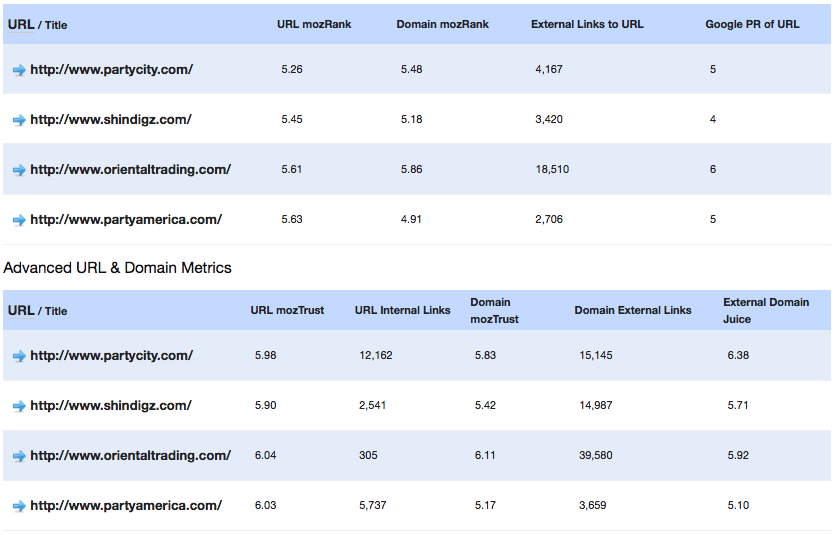
(Linkscape analysis of the top 4 sites ranking for ‘party supplies’)


As you can see a basic comparison report can give you a wealth of information, from the number links that are actually going to the homepage URL to the amount of trust or authority SEO Moz gives a domain.  These might seem like obvious metrics to the more experienced or seasoned SEO vet, but in the fast paced world that is SEO it is very easy to over look these HUGELY important factors.

So you’ve analyzed the competition, now what? Seek and destroy, dig deeper to find out which of those 15k links are actually passing the most trust and authority for party supplies to Google.  What do the sites beating you have in common besides links? Unique page titles and descriptions? Content strategies? Alt-text on their images?

What’s their presence in social media? I could go on for days.  The point I am trying to make is that generally there is more to the explanation than “building more links.”  As Google’s algorithms become more and more advanced, shady link building practices and black/grey hat tactics will fall by the wayside.  Long term success and sustainability in SEO will run deep with the people and companies who go the extra mile, plan ahead, and execute.

Monday, October 25, 2010

Critical Thinking & SEO – Managing Learning and Your Approach to SEO

Tackling the development of a new search and social media course is no mean feat – ask Aleksej Heinze,search and social media course.
from Salford University’s Business School!  He’s been the driver behind a new academic-led, industry-supported
Description: http://sharetv.org/images/weird_science-show.jpgWith MEC’s support for the course, Aleksej and I have met a number of times to discuss areas of the course’s content, with a view to develop not purely from an academic stand-point, but to consider real-life scenarios.  One of the things that came out of the debates we had then was this idea of posing several alternative approaches to search and social marketing in a way that prompted this idea of a course that promotes a foundational and more advanced level of understanding, with a thread of critical thinking throughout.

I love this idea.  I’ve previously shared what we work to deliver as part of our SEO training academy over on SEP, and one of the key items we raised here was in nurturing people’s analytical and inquisitive behaviour in SEO.  We’re working in a very subjectivity-led industry, as opposed to that of an exact-science.   SEO is an art built on the peripheral knowledge of the science of information retrieval after all, and even where people work towards making their approach to SEO more scientific, it’s nothing more than a weird science at best.

Critical thinking challenging misinformation

I like the idea that we dig in to out analytics and visibility, we test and explore on-site and off-site approaches to search engine optimisation.  As long as we share these observations with an understanding that isolating these test from unknown variables, sample sizes, caveats and a reframed methodology if necessary for the next round of tests, then I think this can be a healthy process to go through that just taking from elsewhere in the community.  This does not mean to say that all research should be shared, but just to say that even if you’re a bedroom SEO, then keeping an eye on the limitations of what you and others are testing is really quite healthy.

We recently shared some early observations on Google Instant usages in the UK.  We shared the shared the sample size, the number of verticals the test stretched across, limitations, a brief explanation of the approach to the analysis makes the research a little more valid, and very open-ended conclusions (making this more observational than definitive conclusions).  Through this approach it makes it easier for others to test for themselves the validity and value of what is being said, as opposed to just loose supposition.

I see Michael Martinez as someone with a very forthright opinion around the management and understanding of SEO, and certainly someone where critical thinking appears as a common thread in most of his articles.  For instance, on this very subject of science, SEO and chatter:

“…we share, we discuss, we analyze, and we critique. Scientists do this all the time. The chief difference between real scientists and SEO scientists, however, is that real scientists agree to be bound to a standard of quality that the SEO industry eschews…The science is based solely and completely upon what we do share that is confirmable and reliable. Everything else is just talk.”

This differentiation is a very healthy one.  Highlighting what is chatter, and what is definitively scientific in approach and output is all part of critical thinking, and I think that people can really take something away from this.  SEO is, without a doubt, still in its infancy.  It is still shaping up as an established industry, and it certainly hasn’t developed a comprehensive understanding of how to approach tests, knowledge sharing and the conclusions we pull from this.  But with that in mind, a little more critical thinking and a more resolute focus on the real value of what is being shared in training rooms, books and blog posts world-wide should almost certainly be a good thing.  I think so, anyway.

SEO Pride and Prejudice

Like many, I want to go to work and feel pride in what I do with the teams of people I work with, and this sense of pride may well be helped by the sense that collectively in our offices, we feel that we are delivering a solid SEO service, far beyond that what we are exposed to in many other places elsewhere.  So although we feel that other SEO propositions are misguided (which in itself is quite flattering and enlightening for our own), but it does require an element of astute critical thinking to highlight what we believe is good, bad and unhelpful information for how we approach SEO – and this is the whole point of this article.

Others though, see this wealth of misinformation as a real competitive advantage, including Aaron:
“I used to dislike misinformation in the SEO industry, but I have since come to realize that the more misinformed the public is the more opportunity there is for me. If it wasn’t abstract and full of misinformation then someone overseas would be doing it for $5 a day and I would lose most of my income. So I say let’s see some more bogus scientific studies.”

Now, I wouldn’t go down such a hard-line route as this, as I personally think that there are too many areas in the provision of SEO consulting that really can’t be provided in a more commoditised way (just in the same way as marketing, PR, creative teams haven’t been outsourced to more inexpensive regions of the world).  That said, I do think there is a great deal of value in the comment, as it essentially acts as a sort of filtering system – separating the wheat from the chaff.

Critical Thinking & SEO Strategy

Transferring critical thinking to the way we learn is only one application though; developing plans and delivering activity with critical thought can be hugely helpful too.  So let’s get down to a few tips…
Quite a few years ago, two gentlemen, Simon Wootton and Terry Horne, developed 6 suggestions for critically evaluating strategic ideas and plans.  These were:
  • Competitiveness
  • Controllability
  • Compatibility
  • Feasibility
  • Impact
  • Risk
At a strategic level you can quite easily see how critical thinking of this nature can really test the true value of ideas in the context of which they sit.

But, how do you teach day-to-day critical thinking?

Some might argue that critical thinking can’t actually be taught at all, and it’s actually more to do with what the person was born with between their ears, but I whole-heartedly disagree.  I think you can quite easily teach someone to work to a framework of which challenges the validity of an opinion, and develops a reasoned, critical judgement of their own.

The UK’s Open University provides a few ideas around how critical thinking can take shape, and importantly, how you can nurture critical thinking. A few take-aways from these articles that I think are especially helpful for those more SEOs interested in critical though include:
  • Pause for thought when reading – we’re in an online industry where we know scanning of content is prevalent so occasionally pause for thought.
  • Actively learn – critically engage in the content.  Ask yourself how, why, what, when, who, etc as often as you can about subjects you think are especially important.
  • Work with others – learning alone is not going to be helping in moulding balanced and considered opinions as through shared-learning we naturally test each other’s understanding.
  • Think independently – just because you’ve read something, doesn’t make it true!
There’s really isn’t anything too sophisticated in what is being said here – something I often think when reading management books, but challenge is really bringing to life as part of your day-to-day behaviour.  Are you up to the challenge?!

Anyway, give it a try – see if this sort of approach to reading blog posts, books, attending seminars or conferences, changes the way you understand and use the information around you.

How to Promote Your Blog Old Content to Build Links and Traffic

Blogging is exciting as each great published piece brings you new listeners and builds your community. But is it all about new posts? Is there any way to leverage the power of already written and published content – can it be used to build and strengthen your online presence?

Yes, this can be done, and here’s how you can do that:

1. Tweet Old Posts

“Tweet Old Posts” is a genius WordPress plugin I came across just recently. It lets you automatically tweet posts from your blog archives and allows you to set the following:
  • Tweet prefix (to introduce each tweet);
  • URL shortener to use;
  • Hashtags to include in the tweet;
  • Minimum interval between tweets – allows you to determine how often the plugin will automatically choose and tweet a blog post for you.
  • Randomness interval – This is a contributing factor in minimum interval so that posts are randomly chosen and tweeted from your blog.
  • Minimum age of post to be eligible for tweet – This allows you to set how old your post should be in order to be eligible for the tweet.
  • Categories to omit from tweets – This will protect posts from the selected categories from being tweeted (Additionally you can exclude any specific posts as well).
Tweet old posts
When used properly (without spamming your followers with dozens of old and outdated Tweets daily), it can be a huge boom for your old content. I’d recommend setting it to tweet no more than once a day and exclude all “newsworthy” categories that could result in outdated Tweets.
Also getting creative in using the plugin would surely enhance it effectiveness: for example, with a niche blog (or blog category) you can create a tricky hashtag to introduce each tweet:
  • #socialmedia start up of the day {here goes the tweet};
  • #frugalrecipe of the day {here goes the tweet},
  • etc.
This way it will be interesting to your followers and will probably create a popular hashtag (and even tradition) tied to your blog.

2. Feature Old Posts (“Most Popular” and “Related Posts”)

Displaying links to previously published posts has numerous benefits:
  • Dramatically increase click-through (people who are very interested in the topic are most likely to want to read more on this);
  • Increase the crawl depth by introducing additional inter-linking;
  • Leverage your old content (you are likely to see your older posts commented, tweeted and stumbled).
I have done detailed overviews of various plugins that automatically link to your blog old posts as “Related” and “Most popular”. There’s no point in listing the tools again here.
Here are the round-ups:
  • 3 Ways to Display Related Posts in WordPress Blog: YARPP, Arkayne and Google Related Links;
  • An Alternative “Related Posts” WordPress Plugin – Where Did They Go From Here – The plugin that relies on “behavioral” relevance:
    When a visitor views a blog post, the plugin checks to see if the referral is another blog post on your site. If this is the case, then the referring post is updated with a reference to this post. And, the process continues as the visitor moves through the blog.
  • 3 SEO-Friendly WP Plugins to Display Featured Posts: select which posts to feature manually;
  • How to Smartly Interlink Your Blog Content with SEO Smart Links: the great plugin that automatically links keywords and phrases in your posts and comments with corresponding posts, pages, categories and tags on your blog.
Related posts

Sidebar options:

  • Most popular posts by number of comments: “Popular Posts” Widget and Intense Debate
  • WordPress popular posts plugin lists your posts either by comment count, views or average daily views.
popular posts

3. Round-up Old Posts

Round-ups are great for generating additional exposure to your previously published articles. If you get a bit creative, you can make thematic round-ups for really old articles, for example:
  • “Top social media start-ups we reviewed last summer (and where they are now)”,
  • “Best frugal recipes we discovered last year”,
  • etc.
These types of round-ups will be both useful for your readers and allow you to naturally link to a bunch of your last season articles.

Now, to the good news. There’s a great plugin that lets you automatically generate roundups for you to save time!

It won’t publish the roundups automatically - it will only generate them based on the specified criteria and let you copy-paste and customize your roundups.

The features:
  1. Build the roundup or the summary post for any time span, may be week or a month or any time span(this is great if you want to round-up last year’s posts)
  2. Use (or change) the default CSS of the roundup;
  3. Select only required categories for the roundup
  4. Reorder the posts and the category headers in any order
  5. See flags for the duplicate posts (those that got included from different categories). So you can remove that post from either or the category list while generating the roundup post.
Enjoy!
Instant roundups

4 Tools to Find Related Keyword Phrases for Varied Anchor Text

Recently, I have been hearing complaints about having websites drop out of rankings (or at least get bumped down a bit) for one particular keyword phrase, but not others. The assumption is likely that it is a penalty based on un-natural linking activity for that keyword phrase.


If this is happening, how can you prevent your top keyword phrase from getting slapped by Google? Vary your anchor text of course.

Natural Anchor Text

Google likes natural, and, if you think about it, people who are not SEO’s are going to link to a variety of things that you should be using on occasion too, including:
  • Website Name or URL
  • Company or Brand Name
  • Click Here – as generic as it may be, it also entices more people to click on the link, so while the SEO value may be low, the CTR will be rewarding.

Anchor Text Research Tools

First off, if you’re completely stumped, you can start with Open Site Explorer to see the anchor text distribution that your competitors use. All you need is a free account with SEOmoz to see the top 20 keyword phrases used.


If you’d like to know who’s ranking for your keyword phrase organically, as well as some related terms that have high CPC value, check out SEMRush and search for your keyword.


Once you have your primary keyword phrase, use the following to get ideas on other phrases that you might want to rank for, or at least include in your mix of anchor text.


1. Google Suggest

As mentioned above, Google Suggest provides a nice selection of related keyword terms to your own. Simply start typing in your phrase and it will do the rest for you.


Google Suggest for Link Building
And it’s not a bad idea to branch out and think of other phrases to use as anchor text. Someone may enter your targeted keyword phrase and get distracted by some of the suggestions that pop up in the search, more specific terms you may not be ranking for.


2. Google “Searches related to” Links

A little less popular in the scope of things, considering the positioning, but Google also gives searchers who haven’t found what they are looking for on the first page additional popular searches related to your search term. These may provide additional ideas for keyword anchor text phrases.


Google Searches Related to Link Building
3. Google Insights

If you would like to dig into trends related to your keyword, take a look at Google Insights. It will show you the trending popularity of a search term, which you can view within a time period of 7, 30, or 90 days, 12 months, a particular year, or the default of 2004 to the present.
Google Insights Trends for Link Building


Below this, you will see your keyword based on regional interest, where you can drill down into specific locations. For example, in the map below, you can see that the top states interested in link building.


Google Insights Regional Interest in Link Building
After the map, based on the region you are viewing, you will see the top searches within the time frame specified related to your keyword phrase, as well as rising searches for new trends that may be emerging in your niche.


Google Insights Search Terms for Link Building

4. Commercial Intent

Microsoft adCenter Labs offers a tool for detecting online commercial intention that will tell you whether a term is more likely to be searched for based on informational value or actual intent to make a commercial transaction.


This tool can help you gauge whether some of the additional phrases you are looking to build links for will be likely to result in someone looking to purchase your products or your services.


Microsoft adCenter Labs Detecting Commercial Intent


As you can see from the above example, “link building company” has a commercial intent probability of .87, whereas “link building strategy” has a non-commercial intent of .62. You can also offer your feedback about the tool’s accuracy if you feel the result is skewed.

Your Anchor Text Strategy

Have you ever been sandboxed for over-linking to one phrase? How do you vary your anchor text to make your link building campaign look as natural as possible?

source from:searchenginejournal.com

If You Tweet In A Forest… Blah Blah Blah No One Cares

According to a new study, no one really cares what you’re tweeting.* … #wtvr
Of course, it didn’t really take a study of 1.2 billion tweets to find that out, though at least now we know just how much people don’t care!

No, it didn’t take a study because if you just use Twitter, you’d know it intuitively.
And if you speak to Twitter advertising networks, they’ll admit that their CTRs are terribly low (far below 1%). (Ditto Wayne Liew’s data.) In fact, here’s some campaign data of mine from Ad.ly.

Ad.ly CTR and CPC stats averaging about 0.1% CTR
And similarly, other people like Leo Laporte notice that Twitter is really about … wait for it … ME!
Not you…

Not being social…

It’s about me! @Reply me? W000h00000! DM me? Yessss!

Ok, I’m exaggerating.

But it’s a lot easier to just focus on who’s paying attention to you than to go out of your way to pay attention to others (except for news, humour and other tweets with really engaging material, because those feed our reward systems similarly to the attention given us by @replies and DMs.

So what?

Well, for everyone using social media to [officially] you know… be social… you may need to measure the strength of your relationships.

My best guess is that the most effective way to measure the strength of your relationships is something like TwitterBFFs.Or maybe using friendfeed.

Maybe with the help of lists, as Wayne mentions.

Maybe your friendly neighbourhood HR manager might help out.

And why would you measure the strength of these relationships?

Because what gets measured… gets managed.

*(According to another study**, Wired paraphrased the study in roughly its entirety, adding no unique new value and sold ads on those pageviews. That’s l4me aggregation. Aggregation post via Quebec tech journalist @mcken.)

** Really my own unscientific observation from, y’know… reading the piece.

source from:searchenginejournal.com

Friday, September 24, 2010

Enhance Google Search Results with Interclue FireFox Addon

Interclue is a nice FireFox addon that lets you preview the linked page content. But it does not only that. In facti it could be a cool Google search companion.

1. More informative search results

The addon adds Delicious tags below each results for you to better understand the page topics as well as usefulness. when you hover over any tag, you will see how many times exactly that page was saved using the tag:
Interclue Google

2. Page Preview and Further Info

You can preview each page contents without ever leaving Google’s SERPs. The preview pop-up includes:
  • The search result text;
  • The linked page thumbnail (upper-right corner);
  • “Meta clues” that provide further info on the linked page.
The meta clues may can include (you can add / remove meta clues from the tool options):
  • Page date (from the page header);
  • Page stats (number of words, number of links, number of files);
  • Syndication links:
Interclue Google reslt preview
What’s more, you can actually switch between search result previews using the green arrows you see above: click any of them to load the next / previous result right in the preview window – how cool is that!

3. “Similar Pages” and “Cache” Link Preview

You can easily grab further information on the page right from the search results. Just hover over “Similar” pages and get the list of related results right in the preview pane:
Similar pages interclue
Similarly, you can load the page Google’s cache version in the preview pop-up:
Interclue Google
All in all, I found the tool a huge time-saver! What are your thoughts?

Tuesday, September 14, 2010

All About Google Instant – Summary

Google launched ‘Google Instant’ last week with a much hyped press conference with live streaming video of the event on YouTube. Since then the social media buzz and the blogosphere have been invaded with tweets and posts about Google Instant.


Google claims that Google Instant makes the search experience more fast, fluid and fun.


The main components of Google Instant are :
  • Predictions
  • Instant Results
  • Scroll To Search
Google suggests or predicts what the user might be searching depending on each character the user types in the search query box. The user can select what he is searching for by using the arrow keys and as the user makes the selection the search results keep on changing accordingly. The user does not need to hit the ‘Enter ‘ key.


What is important to note is the speed with which it all takes place. Its fast and really fast. Google Instant can save 2-5 seconds per search. Google claimed at the launch event that in just an hour that Google Instant has been up it has already saved 36,542 hours of our time. Well if time is money then it surely has added that much productivity potential also to every industry as search is a vital aspect for research and knowledge for each and every industry and this shall surely reduce a lot of disguised employment.


Marissa Mayer of Google who presented this concept stated that Google Instant isn’t search as you type, it’s search before you type. She even mentioned in an interview that Google Instant is to search what power steering is to a car and it surely helps people with slow typing speeds.


Google Instant has started rolling out to users on Google domains in the US, UK, France, Germany, Italy, Spain and Russia who use the following browsers: Chrome v5/6, Firefox v3, Safari v5 for Mac and Internet Explorer v8. Please note, users on domains other than Google.com can only access Google Instant if they are signed in to a Google Account. Google will continue to add new domains and languages over the next several months. Google Instant is not yet available on mobile, but Google plans to release it soon.


Google Instant is being referred as search at the speed of thought. But what has to be considered is the impact of this on the users, the search experience as a whole and the future trends in t he search and SEO industry as a result of this speed incorporated in the display of search suggestions and search results .
No doubt search is faster but due to the fact that the users are just using the arrow keys to select the predictions made the user starts focusing on the first few results and the inclination of scrolling down may decrease over a period of time as user starts searching for more queries rather than more searches per query. In a way it has a direct effect on the patience levels of the user.


Moreover, if the user is focusing on the first few results then Google needs to list more relevant results instead of results from Wikipedia or other verticals as when people search they want to know about companies offering the product or service they are searching for – locally or globally.


This should force Google to display quality results but, if this initial display slot gets occupied by PPC and especially the companies with high search marketing budgets then it shall affect the benefit derived by the SMEs due to organic search. As I mentioned that over a period of time the tendency to search for more by scrolling down the page and searching other pages may diminish.


But on the other hand considering the technological advancements in hardware also, it seems that this problem maybe soon be solved. As in the near future there is expected to be a huge shift to the mobile devices and if more and more people start using smart phones, IPads and other mobile devices for searching and surfing then the touch screen devices shall make the scrolling and searching for more easier and faster.
As regards the SEO industry Google instant has not affected the rankings. The basics of the search are the same. So for whatever terms your site has been ranking it continues to rank for them on those SERPs.
So the SEO scene is very much unaffected but Google Instant might just cause a temporary disturbance for the SEOs when all the clients start demanding to be in the first 3 positions. But, Understanding the changes in the search behavior, due to the introduction of Google Instant will need actual data that can be collected over a period of time. Hence we have to wait and watch to find out the actual impact.

source from:searchenginejournal.com

Friday, September 10, 2010

How to Engage Your Blog Readers with Cc:Everybody

A few weeks ago I wrote a review of a cool new service Cc:Everybody started by people behind Omgili (the service I have just mentioned recently in the post on choosing SEO hosting). Basically, the tool provides a way to take advantage of your useful email correspondence which would otherwise have got lost in your private inbox.


The best thing about the tool is that it’s a huge playground. You can think of new and new awesome ways to use it. What I decided to do is to use it for an email Q&A session.

First, what did I do?

Setting Up Your Public Email Inbox

Registration is quick and easy. I registered and got my public email inbox. Now, once I have some useful email correspondence I would like to share with the world, all I need to do is to CC my @cceverybody.com email address. The post will go live and shared publicly after I confirm the action (via email or online).
Note also that all further back-and-forth correspondence with the same person on the same topic, gets automatically published in your public inbox in the same thread.


The second thing I did was adding my Twitter account – this way…

  • I can reply and publish any Tweeted questions as well (referencing my Twitter account)
  • I can automatically share my public correspondence on Twitter.
Besides publishing your email correspondence online, you can:

  • Comment on others’ threads;
  • Receive comments from readers and moderate comments;
  • Pin (or stick) any conversation for it to always appear on top (just like in a regular forum).

Playing Further

Then I started playing. I posted an update to my personal blog inviting everyone to send their SEO-related questions to my @cceverybody.com email address. I got quite a few questions but replied to only most interesting ones (and to those I knew what to answer).


I got great feedback from Twitter followers and blog readers:

CCeverybody feedback
Then, I also used this plugin to update my post of new answers I publish (Read: Blogify Your Static Website for Google):
Embed CC:Everybody updates
To publish the RSS feed of your CC:Everybody mailbox updates, use this code to fetch and display your inbox atom:
http://cceverybody.com/username/atom,num_items:=100,random:=false,show_description:=true–>
For example, for me that was:
CC:Everybody atom
Note also, that not only my original post gets automatically updated of new answers in my public inbox. My Twitter followers get those updates also. And all I need to do is just forward my email to my @cceverybody.com email address.
In seconds my email Q&A session gets comments and retweets:
CC:Everybody comments
While I didn’t have too much time to play as much as I would like to, I liked how the experiment went through. Imagine if you put some time, effort and creativity, you can come up with the powerful Q&A content, for example!

My personal conclusion is that Cc:Everybody is a great tool and I’d love to hear your thoughts!

source from:searchenginejournal.com

5 Facebook Fan-Acquisition Strategies

These are the only five ways to get Facebook fans. If you have another way, it’s wrong. Just kidding.
These 5 fan-getting techniques are part of what I call my Complete Facebook Marketing System (yet another audacious title that will turn some commenters into haters).  The system is a two stage process for getting fans, then getting revenue. I’ll tell you below where to find more info about that if you’re interested.
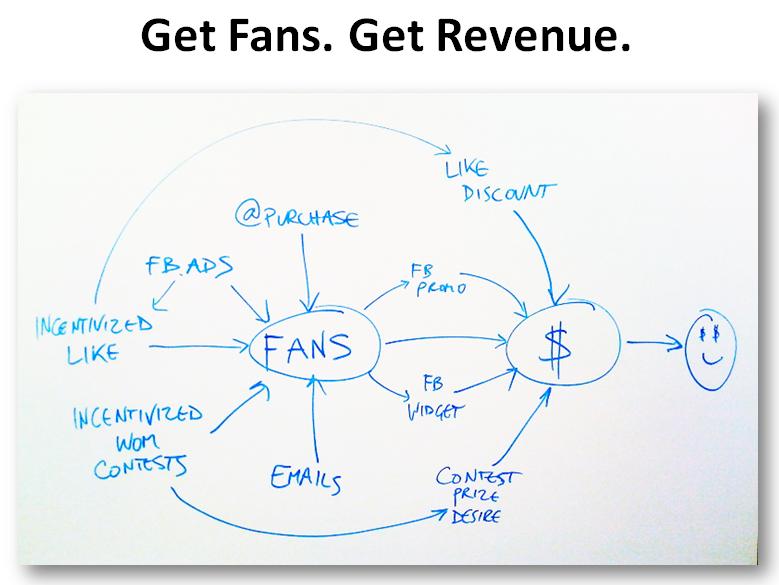
Here’s what the system looks like:


Yeah, I make cool systematic diagrams. But it’s more than just a pretty picture, because it came from real world testing of what works and what doesn’t. It was derived from proven results on Facebook for multiple clients, both mine and the work of a handful of other Facebook marketing stars in a variety of verticals and including companies like Axe and Hershey’s, but also local companies. And it can work for lead generation, with some modifications.


Here are the five fan acquisition strategies:


1. Turn Buyers Into Fans At Time of Purchase


This is a no-brainer. If they like you enough to buy, there’s a good chance they’ll like your Facebook page, but it requires a little work.


The easiest way is to make a Facebook Like Box the most prominent thing on your thank you/confirmation page.

A more difficult but stronger strategy is to use another incentive to get them to like your page- for example, a contest that requires liking to enter. With a little programming, you can require they fan you and post a message on their wall about you, and then you can add them to your database of contest entrants immediately. This increases your fan-base and gets some word of mouth out about you as well.


NOTE: there’s a lot of controversy about contests and the Facebook Terms of Service; the upshot is that if you talk to a Facebook rep and get yours approved, you can do more. The downside is that you’re not going to have a rep to have that conversation with until you’re spending 5 figures on Facebook advertising.

2. Incentivized Like, or “Reveal Tabs”

Facebook pages have evolved toward better business results. Here are the stages of evolution so far:

  • Get a Facebook page
  • Create a special landing tab for new visitors who haven’t LIKED the page yet, make that the default tab for non-likers
  • Add a special reward (like a discount) to the landing page for Facebook users specifically
  • Require people to LIKE the page before they can get the special thing – now the reward is an incentive
The “Incentivized Like” increases the percentage of new visitors that like your page. And if you run Facebook ads, that decreases your cost per new fan.

Matt Monahan coined the term “Reveal Tab” – I call the pre-like tab a “reveal tab” and the post-like tab the “revealed tab”.And yes, the next stage of evolution uses Facebook Apps.


3. Facebook Ads (Social PPC)

Facebook pay per click advertising is a huge topic (you should check out my free training, “Pay Per FACE: 52 Facebook Ad Tips and Best Practices” for a start on Facebook ads). I’m going to have to issue a Part Two to that soon, because I’ve learned a lot more since then. But that’s a good basic intro.

Combine good Facebook Ads with the “Incentivized Like” strategy above, and you’re getting the most fans for your money. This combo-strategy can lead to up to 80% of visitors becoming fans.

4. Incentivized Word of Mouth Contests

We found that, if you have something (or a variety of things) you can give away every week, you can boost
  • Engagement,
  • Word of mouth, and
  • Fan growth.
If you don’t have anything, look for partners that do have things to give away that want more exposure themselves. Then you both benefit from the conversation and fan growth it drives.
The basic idea is:

“Hey, post X on our fan page wall, and whoever gets the most likes and comments wins a Y.”
X is the conversation, and Y is the prize.

  • The conversation could start with any question relevant to your offerings, benefits, or audience.
  • You can combine it with a survey need you have.
  • Or most ninja of all, make them think about the core desire or dream your offering fulfills for them.
  • Or the easy one: “Tell us why you think you should win the prize.”
You’ve told them they’ll win if they get the most engagement, so you’re incentivizing them to post and then tell all their friends to come to the wall to like and comment, and what do those friends have to do first? LIKE your page. ;-)

5. Email Transformation

This is a trick I got from one of my Social Media Expert interviewees. It also might be a hole that Facebook will plug one day, so now’s the time. Depending on the size of your email list and how you value your social media list, it could be worth thousands of dollars to you.

Some say a Facebook fan is worth twice what an email subscriber is worth, because you have to ability to reach their friends too. It’s much easier to get a fan to bring their friend in than for an email subscriber to get you another email subscriber. And the value of a fan or email really depends on what you do with them. If you’ve made money from your email list, you may be able to make a rough guess what a Facebook fan is worth to you.

There are other more obvious wasy to turn emails into fans:

  • Include Social links in all your emails
  • Send an email quarterly about your Facebook page and tell them about your “Incentivized Like” discount
Then What? How Do We Make Money From These Fans?

That’s the next step. There are four or five primary strategies for that, but it’s beyond the scope of this article.
If you’d like more, I’m working on a free training video on the Complete Facebook Marketing System. It contains the fan getting strategies and the revenue generating strategies, and since it’s audiovisual, it’s a little bit easier to grasp than just reading all this text. If you hate reading, you might like that better :-) But, to get it done, I just need a little more spare time… this dang Facebook marketing is keeping me too busy!

source from:searchenginejournal.com

Monday, September 6, 2010

Why Brand and Reputation Management SEO are the Way Forwards

If I were to sit in a meeting with a big client now and tell them to slash a little of their traditional SEO budget and instead spend more time optimising the top 30 SERP’s for variations of their brand names, they would literally laugh me out of the room.


People and big companies have only these last few years got their heads around SEO, they now know that in order to get more traffic, more sales and more revenue, you need to optimise your site and make its targeted keywords appear as high as possible in all the major search engines.


But moving forwards more and more independent SEO’s are going to be jumping onto the scene, as well as this more and more SEO companies opening up shop. So with even more SEO’s and more companies competing for the same term(s) every sector is going to be a battle field, but there are a few options:


  1. Optimise for long tail terms and drive traffic through with ranking for quantity terms rather than the quality ones. (Again this will start receiving huge amounts of competition).
  2. Optimise for local terms and then slowly optimise for all the locations that you cover, you will have a lot less competition, but will the search volume and customers be there?
  3. Finally and this is what I see expanding rapidly in the next few years, especially for mid sized companies and large companies that are already advertising by other means and already get a lot of direct traffic.

If you look at some of your client’s analytics data you will see that, some of the terms that actually bring the most visitors are their brand terms. As an example, do you know how many people actually go to Google and type in Facebook rather than just typing it in the browser?…….  1,680,000,000 that’s how many!
Now that is not even including mis spellings, so now imagine your client getting a fraction of brand searches, or for the rich and famous reputation searches. Currently there are not many SEO’s concentrating on this factor, but let’s just think about what happens if you do not own the rest of the sites, in the Top 5 or the Top 10? You are basically going to be losing traffic that you could have easily grabbed and converted.  But what is even worse is imagine that Top 10 for your branded term had 3-4 bad experiences or false negatives about your clients company or image, you could potentially be missing out on lots of click throughs even though you are number one for your brand term, because people are seeing the negatives about you.


Description: graph.jpg


Brand and reputation searches are on the increase, just take a look at the above graph, this is persistent with most brand terms.


Over the next few years Brand management SEO and reputation management SEO will literally have to be offered as a separate service to clients, because although you may be number 1 for your brand. Is that really enough? What do you think?

source from:searchenginejournal.com