Showing posts with label seo tips and tricks. Show all posts

Thursday, November 18, 2010

The Key To Increasing Inquiries, Leads, Sales…

If you want to increase __________________ by ______% <5, 10, 30, 50, even 100%> then you need to pay close attention to this post.
There is one thing most site owners could do to increase results that they aren’t doing.    What is that one thing?  Split testing!

So, testing – that’s nothing new.  What’s the big deal?  The big deal is that most people overlook this and miss the opportunity to significantly improve their response rate.
Let’s look at an example: You run a PPC campaign on Google AdWords and you have one ad running. Let’s say you sell shoes, and here is the ad you were running.

Designer Shoes are Affordable
Women’s Designer Shoes
Big names, great prices
Now, let’s say your click through rate (number of people that click on your ad) is 4.2%.  You are happy, because that’s better than you’ve ever done before. What most people do is keep running with that ad.  What we want you to remember to do is Split Test.

All that means is create a second version of your ad, to compete against your first version and see which one wins.  So, now look at version 2:
Designer Shoes are Affordable
Lady’s Designer Shoes
Big names, great prices
Do you see the difference?  Only one word (more about that in a minute).  In the first ad we have Women’s Designer Shoes and in the second ad we have Lady’s Designer Shoes.

So, let’s look at the results.

Ad 1 – 4.2 click through rate
Ad 2 – 5.1 click through rate!

You just increased your response rate by 21.4%!  No extra costs, simply changing one word and getting an improved response.

Why did more people click on Lady’s than Women’s?  We don’t know, we may never know, but we also don’t care (well that’s not entirely true, if you can understand the reason why something performed better, you could learn from that for your next round of tests but for now, let’s just say the reason doesn’t matter….all we know is have now improved our click through rate!)

Now are we done?  Not even close.  Now we take Ad 2, and create another ad to split test against Ad 2.  You can constantly test 2 ads against each other and incrementally increase your response rates.
What can you test?  Anything and everything!  Test your ads, test headlines on your site, test your pricing, test colors.  Test, test, test.

There’s so much more about testing that I could go into, but we’ll have to save that for another
time.  For now, just remember these 2 important points…

1. Test EVERYTHING!

2. Only make one change in each test for accurate results.  If you were to change the headline and the middle text on Ad 2, you wouldn’t know which was the cause of the higher response.  So, take one thing at a time and test, test, test. (that is assuming you are doing A/B split tests – if you do multivariate testing you can test more than one thing but we’ll leave that for another day)
Here are a few other testing case studies:
  • Girls versus Women in a dating ad increased response by 30%
  • “Get Top Google Rankings” as a headline increased my leads (opt-ins) by 13% over “Get Top Rankings”
  • A smaller header graphic on my landing page got me 7% more leads from that page than the larger version of the same header graphic.
You can see the power, if you keep testing and improving your results, you are going to like your new bottom line.

Does every test produce huge results?  No!  But if you keep testing, then you’ll find over time the incremental improvements add up.

The bigger and more drastic the thing you test the more likely you’ll see a bigger improvement.  But it’s also more likely the test could bomb (and real marketers love it when tests bomb, it gives them data for going forward).  So make sure you monitor your test results – if you see something bombing you can halt it and revert back to the control only (the original version) until you come up with your next test.

So hopefully you understand the power of testing.  Now let’s talk about how you go about it.
Start by brainstorming a list of things to test (it could literally be anything – here are just a few ideas).
  • Background color
  • Header graphic versus no header graphic
  • Large header graphic versus small header graphic
  • Price
  • Headline text
  • Opt-in box graphics
  • Picture of a man versus a woman
  • Anything else you can imagine
Even font color and font face have impacted my results!
Once you know where you are going to start, build 2 versions of your page, the original or control being your page as it exists now and the B version will have the one thing you are split testing.  Once you are done, upload both pages to your server (if you can’t work within HTML or a site tool, have your webmaster do this step for you)

I suggest you use Google’s free testing tool (it allows multivariate testing as well as A/B split testing).  It’s a great tool, it’s free and it’s easy to use.  You can create an account here:

www.google.com/websiteoptimizer

Once you login you click to start a new experiment.

Give the experiment a name – name it something meaningful and I also find it helpful to use the date, so I may call one test “AdB-Headline-November17” – AdB is the source of traffic for this page, Headline is what I am testing and the date is the date I started the test.

Then you paste in the URL for the control (remember this is your original page)
Next you paste in the URL for the test page.

Lastly you page in your “conversion page” – this is the page people will land on after they take the action you wanted them to on the above page (so it may be a thanks for ordering, or a thanks for opting-in page).
The Google tool will verify that the pages are live on line and then you click to the next step.  Here you tell the tool if you want to add the java script code that is needed to the page yourself or if you want your webmaster to do it for you.  If you choose to it, it will provide the code and the instructions.  If you want your webmaster to do it, Google will put all the data on to a page and give you a link to send to your webmaster to do.  You can check the status from within Website Optimizer and see when it’s been added to the pages.
You can then validate the pages to be sure that the code is added correctly to the site.
Then you click to start the experiment.

As I mentioned, you should monitor the results.  The tool will analyze the data and tell you when there is a winner.  And then you can turn that experiment off and start a new one.  You should always be testing the latest winner against a new idea and always be improving your results.

You can split test pages on your site, you can split test ads, email subject lines, landing pages for specific ad campaigns and more.

Get testing and be sure to share your results and feedback below!  We can all learn from people’s tests.

Read more: http://www.searchenginejournal.com/

12 Tips For Using Twitter to Grow Your Business

1. Monitor Your Name and Brand

Use the search feature to find out who’s talking about you and your products.
  • If someone tweets something nice about your company, thank them. If it’s really good, ask if you can use their tweet as a testimonial on your site.
  • When someone tweets something nasty about you, apologize publicly, fix the screw up and let them know it’s fixed. If they’re happy with how you handled the situation, ask them if they don’t mind sharing the good news on Twitter. Remember: it’s not just about that one customer; everybody else is watching you.
ipod-nano-search-brand-monitor.jpg

2. Grow Your Network

These are my three favorite ways to grow a Twitter followers base:
  • Follow people talking about a keyword related to your market. They’ll follow you back. Un-follow those who don’t. I use FlashTweet for this.
  • Find the authorities in your market and follow the people following them. They’ll follow you back. Un-follow those who don’t. Again, I use FlashTweet for this.
  • Use Twitter directories such as Twellow and WeFollow to find people in your market.
But remember, it’s about quality, not quantity. I’d rather have 500 great followers than 5,000 good ones.

3. Invite People to Follow You

Include your Twitter link on your site, blog, email signature, and business cards. The more people who see your link, the more followers you’ll get.
follow-me-on-twitter-glossy.jpg

4. Balance Following/Followers

If you follow a lot people and very few people follow you, you’ll be seen as a spammer. If a lot of people follow you and you don’t follow them back, it’s not very nice of you. Use FlashTweet or FriendOrFollowto balance your ratio.

5. Re-Tweeting

Re-tweeting is the equivalent of email forwarding. Teach your followers what re-tweeting is and ask them to re-tweet your tweets. This will result in your tweets spreading to their followers, who then may follow you as well. When someone else tweets about something you find interesting, re-tweet it so your followers can benefit from it too. Plus, when you re-tweet other people’s content, they notice you and want to learn who you are.
retweet-97.jpg

6. Respond to Messages

Click on your Twitter ID to see who’s talking to or about you.
zeke-camusio-twitter-id.jpg

7. Avoid Direct Messages

It’s OK to send some DMs once in a while, but a lot of spammers DM people all the time, so use these with caution.

Read more: http://www.searchenginejournal.com

8 Ways to Optimize Your AdWords Campaign

You may have noticed that Google makes it easy to set up an AdWords campaign, but not so easy to get a return on your investment in pay-per-click. There are a lot of levers you can pull in your AdWords campaign to influence results. Here are eight ways to optimize your AdWords campaign for better ROI.

1. Know your target audience profile

Knowing your target audience, in the context of Google AdWords, goes beyond maintaining a list of demographic parameters that describe the identity of your customers. You also need to keep in mind one important question – how is my audience using Google? Trying to get a feel for their behavioral patterns and letting that behavior inform your selection and use of keywords will give your AdWords campaign an edge over your competition.


2. Speak the language of your audience, not your own
Keep in mind that your target audience may or may not use the same vocabulary that you do to describe what you sell. Your keywords should reflect the way they talk about your offerings, not the way you do.


3. Select primary and secondary keywords
Each keyword in your campaign has a cost that depends on how many others are bidding on it. Your primary keywords are directly related to your product/service. In case of highly competitive products, your primary keywords may prove to be quite expensive. It’s equally important to choose secondary keywords that are not directly related to your product. Secondary keywords widen your reach and can bring down your pay-per-click advertising costs if you choose less competitive segments.
 
4. Select smart site placements
Apart from bidding on keywords, AdWords also gives you access to a wide range of partner websites where your ad can appear. You can choose categories of websites that your target customers are most likely to visit. For example, if you sell digital cameras, you can advertise on photography sites or sites that target gadget-lovers.


5. Use long-tail keywords for high conversions at lower cost
Online users are gradually using longer key phrases rather than keywords. These longer phrases have lower search volume than common keywords. However, long-tail keywords increase your chances of clicks and conversions since they are very specific. For instance, “digital camera” is a generic keyword. A long tail alternative would be “best deal for Canon 1000D.” If you’re struggling to find relevant longer tail keywords, there are a number of free keyword tools that can help you discover profitable, traffic-driving terms.


6. Monitor conversions, not just clicks
While you pay for clicks, tracking overall conversions from each keyword can help you derive better value out of your campaign. This, however, requires good integration of Google Analytics and AdWords with your CRM and sales management system.


7. Optimize your ad copy
Just like headlines play an important role in a traditional media campaign, having highly contextual ad copy that’s closely related to the keyword being searched for plays a vital role in conversions. An ad for a broad term like “digital camera” might lead to information that would aid the purchase decision of the buyer. However, if the search term indicates intention to buy, the copy should be persuasive and lead the user to a landing page with an option to purchase.


8. Test your landing page designs
The key to continually increasing ROI from Internet marketing is testing. Beyond testing multiple versions of your ads, make sure to test variations on your landing pages. Google offers the Google Website Optimizer tool that can help you decide the best layout for your landing page. Decisions like where to place the “Buy Now” button and what color to make it may be aided by this tool.

Why You Must Look Beyond Google Adwords Click Through Rate Concept

n Google adwords advertising space, click through rate also known as “CTC” is a familiar term. It is the mathematical end result of a situated ad campaign number of impressions divided by the number of clicks acquired at a particular point in time. Google uses this mathematical denotation to measure the relevance of a given ad and accords the ad with some credit reward proportional to the positive or negative outcome of the end result.


One such credit reward is a rise or fall on quality score “QS” Quality score is tied tightly to the apron of click through rate. If an Ad click through rating is high, then there will be a correspondence rise in quality score and if the opposite is the case, it will respond accordingly – thus click through rate and quality score are twin sister metric, dancing on the same wavelength.


The overall benefit of these two metrics to the advertiser is a sharp reduction in bid price and a favorable ad position. This is assuming your quality score level, occasioned by click through rate is on the positive side. This is the chain reaction concept that drives Google adwords program. Rewards for an advertiser’s effort in creating a quality ad that satisfies the aspirations of human visitors and keep them coming back to the program.

Is Click Through Rate Concept a Catch – 22 Or a Greek Gift?

Depending on what side of the spectrum one is, the truth of the matter is that click through rate concept has never been fully explained. When Mr. Hal Varian, the chief economist at Google explained The Concept Behind CTR and Quality Score, there were two things that he did not reveal to his stupefied audience. One: that click through rate does not equal conversion rate. Two: that whether your clicks convert or not, Google is better for it.


The real argument here is not whether we need clicks to sustain our campaign. Of course we do need quality clicks – lots of it at that. But when your campaign starts acquiring clicks at an astronomical rate for the wrong reasons other than conversions, then your days in the game of adwords marketing program are numbered. Perhaps that explains why Google in its infinite wisdom thought ahead of time and introduced the Click Through Rate Concept as a cushioning effect to prolong your dying day in the game. Lose money fast or slowly, you are dying anyway.

How Do We Move Beyond Google’s Jingoism of Losing Money Slowly?

Google adwords is superb and undisputedly the quickest and most widely used online advertising media to showcase your brand and connect with your perceived customers right on the fly. The key to success in this ubiquitous marketing media is buried deep inside of your Keyword phrase.  In fact, if there was to be an alternative name to adwords marketing, it would have been “Keyword Marketing” because your customers must first use some sort of keyword phrase before able to connect to your product.


If you understand the dynamics of keywords, then your adwords campaign will be driven by conversion rate. Most adwords advertisers craft their campaigns around click through rate with the hope of gaining favor from Google thereby saving cost. But Google is wiser because they know that their adwords program is not a place to save money. Whereas Click through rate concept enables you to minimize cost and maximize lost, keyword dynamic concept enables you to minimize cost and maximize profit.  Now, lets take a close look at two hypothetical keywords – “Swiss Wrist watch” and “Maverick I I Titanium” What you will quickly detect from these two keyword is that whereas one is inquisitive and defined to a specific brand, the other is just a wild card without any commercial intention.


If a searcher uses the keyword “Maverick I I Titanium” which also is a family of the Swiss wrist watch to find your ad defined specially for it, the probability of closing a sale is as good as done. The dynamic force behind this high probability is that the searcher already knew that there are so many brands of Swiss wrist Watches but has taken his pain to narrow down and settles for a particular brand.


Again, if you were to deploy these two keywords in adwords campaign, the bid cost of “Maverick I I Titanium” will be next to nothing while you will have to fret and tweak forever before you can strike a balance with keyword “Swiss Wrist watch” The reason is that Google already assumed that “Swiss Wrist watch” is an important keyword because it has a huge volume search despite no transactional relevance while  “Maverick I I Titanium” which has high probability of sale conversion but with low volume search has no relevance in the eyes of Google.


In Summary therefore, it is pertinent to realize from the onset that conversion driven adwords campaign occasioned by highly targeted and defined keyword phrase is the magic wand that brings success in adwords marketing and not the click through rate concept.

Monday, November 8, 2010

9 Sure-Fire SEO Tips

1) Steal Your Competitors’ Keywords

  • Look at the keywords they use in their title tags.
  • Look at the keywords they use to link to their “money pages”.
  • Some webmasters are dumb enough to include their money keywords in their meta keywords tags. Take a look at these but keep in mind that smart SEO people won’t do this. In fact, just to mess with wannabe SEO’s  they might actually put bad keywords in the meta keywords tags to get others to use them.
If stealing keywords sounds shady, its only because I used the word “steal”  instead of “learn” to grab your attention. You should always learn about your competitors; you can bet that they’ll try to steal..err learn your keywords too.

2) Fix Canonical URL Issues

If you can access your site by typing “site.com” and “www.site.com”, Google will see that as two different sites with the exact same content and that can hurt you a lot. To fix this create a file called .htaccess with these three lines and put it in the root folder of your site:
RewriteEngine On
RewriteCond %{HTTP_HOST} !^www\.site\.com$
RewriteRule (.*) http://www.site.com/$1 [R=301,L]
WARNING: unless you know what you’re doing, have someone else do this. All servers are configured differently and you don’t want to screw-up your .htaccess file.

3) Pay Attention to Your MozRank

SEOmoz has a tool called LinkScape that calculates your MozRank. MozRank is a great metric that evaluates the QUALITY of your incoming links. (Most link assessment tools only focus on quantity). If you have more links than your competitors but they’re ranking above you, you should compare your MozRank to theirs; maybe your competitor has fewer links but they are BETTER than yours.
If your MozRank is higher, you have more links than them, and they still rank above you, then you probably have an issue with the lack of keywords in the anchor texts of your incoming links.
Pay Attention to Your MozRank

4) Get a Double Listing

A double listing (or indented listing) can sky-rocket your click-through-rate (CTR)! How you can get a double listing?
  • You need two pages of your site on the same page of Google results. For example, let’s say you have a page A and page B. Page A ranks #4 on Google for “plant seeds” and Page B ranks #15 for the same keyword.
    • You need to take page B from position 15 (second page of Google) to position 10 (first page of Google) so pages A and B are on the first page of Google.
  • Perform this Google search to find out what 2 pages Google finds most relevant to a given keyword: site:yoursite.com [keyword].
  • Now that you know what 2 pages are the most relevant for that keyword, use the SEO Rank Checker Tool to find out the Google rankings for those pages.
  • Optimize pages A and B for your keyword. Link to page B from page A and vice versa using the keyword you want to rank for in the anchor text of the links.
  • Get some keyword-rich links from external sites to pages A and B.
  • Presto! Your listing will look like this one:
Get a Double Listing

5) Use Google Webmaster Tools

You really have no excuse not to use this amazing tool. These are some of the things your can do with it:
  • Submit a sitemap of your site so Google knows what pages they should index.
  • Tell Google what is the canonical URL you want to use (site.com or www.site.com).
  • Detect issues with duplicate title tags and meta descriptions.
  • See a list of URLs restricted by robots.txt.
  • Detect crawlability issues.
  • Find 404 error pages.
  • See the most common keywords people find your site through.
  • Get a list of links pointing to your site.
  • Tell Google how they should index your images.
Google Webmaster Tools

6) Create a Google Sitemap

Now that you’re using Google Webmaster, create a sitemap using this tool: GSiteCrawler.
sitemap

7) Use Google to Get Keyword Suggestions

Start typing your main keyword in the Google search box and get ideas for keywords. For a more detailed keyword research use the Google Keyword Tool.
Google to Get Keyword Suggestions

8) Learn the 4 Truths about the QUALITY of Links

  • Links from authority sites (e.g. CNN) are worth more than links from average sites (e.g. your nephews’ videogame blog).
  • Links from related sites are worth more than links from unrelated sites.
  • Links with your keyword in the anchor text are worth more that links that say “click here” or “read more”.
  • Link QUALITY is way more important than link QUANTITY.

9) What To Do If You Ever Get Penalized By Google

First off, avoid spammy black-hat tactics so this never happens. But, if you’ve been a bad boy/girl, this is what you should do:
What To Do If You Ever Get Penalized By Google


Read more: http://www.searchenginejournal.com

The Google Analytics Metrics That Help You To Monitor The SEO Progress And Also Calculate The ROI

Google Analytics cannot be ignored by any SEO or for that matter any web marketing professional. Google introduces this application which is offered for free by Google as –

“ Google Analytics is the enterprise-class web analytics solution that gives you rich insights into your website traffic and marketing effectiveness. Powerful, flexible and easy-to-use features now let you see and analyze your traffic data in an entirely new way. With Google Analytics, you’re more prepared to write better-targeted ads, strengthen your marketing initiatives and create higher converting websites. “
FYI: The Google Analytics can be accessed here. The analytics product tour video can be viewed here.
If you register and view the data metrics offered you will see that there is a comprehensive portfolio giving you the details about how the visitor reached your web page and what content was viewed and also the client side data which can help you judge what kind of impression your site must have made on the visitor. It also allows you to download the data as an excel sheet or in a PDF format and mail it to the client or create logins so the client can view the data at its own convenient time and his own curiosity level. With Google Analytics data SEO’s can manage to calculate the ROI which can be found reliable by the client as Google enjoys a very high trust factor when it comes to search and search products.

But when you have a lot of data available it is quite possible that one can get confused and lose focus from the purpose of tracking the site. There can be many reasons for tracking the data but let us see from the SEO perspective which metrics should be monitored  daily, weekly, or monthly to keep an eye on where the site is heading to on the web.

I tend to focus on the following metrics, assuming I want to keep atrack of the visits from search engines and the especially visits from Google.

Month
Visits
New Visits
Visits From Search Engines
Visits From Google
Bounce Rate

If you maintain this data month-wise, you get an idea about the improvement or the results achieved as a result of SEO done on the site.

Another important report to be maintained is the no. of keywords with which the site is ranking and the source (you can select the source as Google and get an idea with how many and which keywords the site is ranking on Google and how many visitors are reaching your site via this source and how many pages are being viewed by them)

Let us take the above metrics in detail:
  • Visits: This is the total no. of visits for that month . This will give you an idea of increase or decrease in the no. of visits from all sources.
  • New Visits: The no. of new visits to your site . New visit means the visitor who is viewing your site for the first time. There is an exception and an approximation in this metric as the GA uses a javascript to track the visitor behavior and uses cookies for that , a visitor who may have visited your site earlier but has deleted the cookies and views your site after that then that same visitor is considered as a new visit though actually it is an old or a repeat visit. So, this data has to taken keeping an approximation in mind.
  • Visits From Search Engines: This gives you the data of how many visits the site has got from all the search engines. This can be filtered more to view the no. of visits from each search engine.
  • Visits From Google: After you filter the data from the ( total visits) to (visits from search engines) to (visits from Google) you can track and monitor the increase or decrease from this source and hence measure the success of the SEO campaign on Google.
  • Bounce Rate: This again is an important factor which may not exactly give you an idea about the progress of the SEO on the site but it will surely give you an idea about how many people are finding the landing page interesting enough to view other pages of the website for more information about your company. The Bounce Rate tells you about the no. of visitors who went back from the landing page itself and did not view any other page. This data is in percentage form.
When you maintain this table month-wise it gives you have a clear idea about the SEO performance of the site and you can confidently discuss the details with the client with adequate proof over a period of time and also gear the SEO campaign and tweak the website according to the data available to you.

The above table gives you a quantifying data but the quality of the SEO campaign will be judged by the keywords with which the site is ranking and the increase in the no. of targeted keywords , long tails keywords and others on the search engines and you can again segregate all this to present the keyword and source details winning the confidence of the client further by presenting it in the following table:

Source
Keyword
Visits
Pages/Visit
Avg. Time on Site
% New Visits
Bounce Rate
Data thus monitored periodically will give details about the site from the search engine and SEO perspective and hence will offer clarity, conciseness and confidence about the ROI calculated.

A simplest ROI calculation would be attained by answering these following questions:
  • How many visits received from search engines? Let us denote this as – a
  • How many enquiries received via the website form or calls received from visitors after visiting the site which they found via search engines? Let us denote this as - b
  • The no of enquiries thus received got converted to sales? Let us denote this as – c
  • The amount of profit from these invoices drawn? Let us denote this as – d
  • The cost of SEO monthly / annually depends on what basis you are calculating ? Let us denote this as – e
I suggest the ROI to be calculated half yearly or annually as this gives a clear idea.
Hence , (assuming you keep the period of the calculation the same for all the metrics)
ROI = (d – e) / e * 100
Basically,
ROI = ( Annual Profit from the sales which were achieved via the Enquires from search engines – The annual cost of SEO for the website) divide upon (The annual cost of SEO for the website) multiplied by 100
There can be many permutations and combinations that can be worked out in order to get various performance data as per your requirement. For example if you want to measure the conversion ratio of your sales department keeping in mind the online enquiries received then it can be done as follows:
Conversion Ratio = c/ b * 100
This can become as a KPP (Key Performance Parameter) for your sales team which can be monitored on a periodic basis to have a direction and guidance for chalking out the sales plans for the next period with a targeted approach and also the reasons for the low or high ratio can be discussed and therby helping to find the strengths and weaknesses in the system .

All these calculations are very simple but the recording of data about the no. of online enquiries generated and thereby the sales achieved has to be done from the client side and the data has to be given to the SEO so that a targeted report can be prepared and offered to the client for reference and to go ahead without doubts and ifs and buts.

Half the data comes from Google analytics for which the login can be created for the client to view and monitor by themselves and the other half has to be given by the client himself . So, if the client or his team is competent enough to calculate the ratios themselves then the onus is also on them else they have to cooperate with the SEO to offer the data so all these calculations are possible as only this guided approach can give the SEO the sense of satisfaction and the client the idea of the online progress of his website due to SEO.
Eventually, all analytics is has to be taken with an element of approximation but the overview of all this data monitored, recorded and filtered accordingly for the purpose surely shows us the road ahead and helps us to tap the online market with confidence and assuredness.

Competitive Keyword and Link Research that Works

Having an effective link building strategy is crucial to the success of any SEO campaign.   That being said, a great link building strategy for one client or site, may not not translate to another.  The cookie cutter link building mentality  is where many SEO’s often fail.

I’m going to go out on a limb here and say it’s probably not the best idea to implement the same link building practices on the keyword health insurance as the keyword plastic injection molding.  Putting every site you work on under the same umbrella is a recipe for disaster.

It’s important to recognize what you are up against in the vertical you are competing in.  Below I have documented my methods of competitive keyword and link research that has helped me rank various sites in recent months.

For purposes of this post I am going to use a fictional site with site characteristics and statistics I randomly applied.
Site: http://www.partysuppliesforyou.com/
Domain Age: 2006
Links:  1,300
Targeted Keyword: party supplies
Anchor Text Breakdown:
40% Optimized Anchor Text (party supplies, party decorations, etc)
20% Branding (brand name, URL, etc)
20% Random (click here, read more, editorial endorsements)
10% Image and No-Follow Links
All of this data can be attained by using SEO Moz’s Linkscape Comparison Report or Open Site Explorer back-link analysis tool.

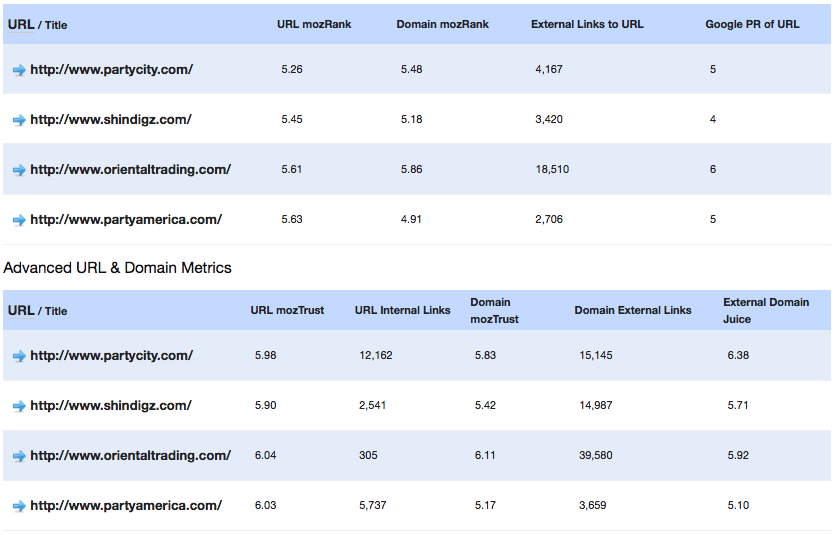
First things first, we need to find out exactly who we are competing against and just how steep of a hill we are going to climb.  Not only will this set the tone for the long road ahead, but give you an idea on how to translate and set expectations for your client.  A simple Google search will reveal who, followed by a Linkscape report how competitive.

(Linkscape analysis of the top 4 sites ranking for ‘party supplies’)


As you can see a basic comparison report can give you a wealth of information, from the number links that are actually going to the homepage URL to the amount of trust or authority SEO Moz gives a domain.  These might seem like obvious metrics to the more experienced or seasoned SEO vet, but in the fast paced world that is SEO it is very easy to over look these HUGELY important factors.

So you’ve analyzed the competition, now what? Seek and destroy, dig deeper to find out which of those 15k links are actually passing the most trust and authority for party supplies to Google.  What do the sites beating you have in common besides links? Unique page titles and descriptions? Content strategies? Alt-text on their images?

What’s their presence in social media? I could go on for days.  The point I am trying to make is that generally there is more to the explanation than “building more links.”  As Google’s algorithms become more and more advanced, shady link building practices and black/grey hat tactics will fall by the wayside.  Long term success and sustainability in SEO will run deep with the people and companies who go the extra mile, plan ahead, and execute.

Timing is EVERYTHING in Online Marketing

There are three main factors dealing with time and online marketing and each one is critical to successful online marketing campaigns:

Time Management

When I ask most people why they are not using social media more, most answer that they do not have the time.   On the other hand, many complain about how much time is wasted online using these channels. Most poorly performing online marketing campaigns; whether social media, online marketing or PPC advertising; seem to be failing because the manager has either put very little time into planning the campaign, or has spent a lot of time setting up a campaign and getting it started but has then left it to ‘flounder’.
Establish a schedule of when you (or those in your company working on your online marketing campaigns) will work on online marketing activities on a day to day basis and for the longer term: week to week, month to month and for the future.   Making a commitment to such a schedule will:
  • ensure that your campaigns are well planned out, with all of your online (and offline) marketing activities working together and inline with the other activities of your business – and, more importantly, inline with the activities/needs of your prospects;
  • make it more likely that you keep your campaigns up to date;
  • bring better results from consistent efforts over the long term rather than sporadic activities here and there;
  • reduce the amount of time wasted on poorly timed activities.
Example of a 12 Month Plan for long term planning:
Time management

Be in the Right Place at the Right Time

One of the main issues Twitter users have is getting people to follow links posted and getting those posts retweeted.  Often posts on social media channels go unnoticed because they are badly timed, whether posted at a time when your key connections are offline or when there is such heavy activity on the channel that your posts are pretty much lost.  I first started looking into timing when working on improving open rates of email marketing campaigns. Like your social media efforts, an email newsletter delivered at the wrong time is more likely to end up lost amongst a number of spam messages.
Identify the best time for your online marketing activities. In my post “Get Focused for a More Effective Online Marketing Campaign” I discuss the importance of thoroughly identifying your target market, which includes determining when they are likely to be online so that you can ensure that you are active at those times.
  • When are your key followers on Twitter, Facebook, etc.? Post your updates during these times. Use a social media app where you can schedule posts, like Hootsuite so that you can post at the right time, even if it is inconvenient for you to be online at that time. Make it a point to be online during some of this time so that you can properly interact with your connections at the best times.
Hotsuite
  • When are those on your email marketing list most likely to be checking their Inboxes? Schedule your email marketing campaigns to be delivered at these times.  If you aren’t sure what time is best for your market, divide the list and send at different times and see which have the best result.
  • When is your audience most likely to be using search engines? Schedule your PPC ads to be shown at these times to improve your ROI.
schedule

Time is Money – so treat it that way

As it is free to participate in most social media networks, and it’s become easier and easier to manage your own email marketing and PPC campaigns, many business owners forget the real cost – the cost of your own time to manage your campaign. It’s important to carefully monitor the amount of time that you are spending in all of your social media marketing activities and compare to the results you are achieving by looking at your analytics.
If you are not getting a sufficient return on the time spent, then you need to review all of the activities and see where you can improve. A few common concerns:
  • Are there certain social media channels that are bringing no return and may be best to leave out of your campaign?
  • Are you spending too much time interacting with ‘friends’ on social media channels, but not getting to speak to decision makers?
  • Do you need to spend more time writing articles for the site, because once a month is not enough?
  • Would you get a better ROI to hire a professional to manage your PPC campaign?
At time is such a valuable commodity, use it wisely – plan, observe, review – and see the great return you get from your online marketing activities.

Wednesday, October 13, 2010

Social Media Marketing in Foreign Countries and Languages

Social media marketing is now a key strategy for any business’s global marketing communication strategy – online marketers understand the benefits of social and know how to deliver a good return on investment in their social marketing endeavours.


However, many English-speaking marketers are missing out on the huge potential of foreign-language social media marketing. There are a number reasons why this may be the case, the most obvious being a lack of knowledge about which social networks to target abroad and how to devise a social media strategy for foreign-language markets.


According to data published by Internet World Stats in June 2010, the top five countries with the highest proportion of internet users are China with 21.4%, the USA with 12.2%, Japan with 5.0%, India with 4.1% and Brazil with 3.9%.  This means that three of the top five internet-using nations are emerging (mostly non-English speaking) markets – the BIC out of the BRIC countries.
These countries are prime opportunities for export and for marketing online, particularly by using social media, but how can you go about reaching these overseas audiences? Read on for some starter tips below – we’ll begin by looking at the most popular social networks in China, Japan, India and Brazil.


China


Renren.com and Qzone.com dominate the Chinese social networking scene. Renren, a clone of Facebook, claims over 120 million users and is popular with students, although the company hopes to capture a wider demographic in the future. Qzone claims to have over 380 million users, although it’s likely many of these are dormant accounts opened via the company’s QQ network, China’s largest instant messenger service. China’s third largest network is Kaixin001.com, which is popular amongst white collar workers. Kaixin001 has developed popular networking games like ‘Slave Manor’ and ‘Happy Farm’.


Japan


The Japanese market is dominated by Mixi.jp and Twitter.jp. Mixi is by far the largest with over 80% market share, which is around 30 million users. Twitter’s official Japanese site was launched in 2008 and has around 5 million active users. Twitter.jp has an interesting revenue model whereby users can charge their followers to view their tweets, either on a monthly basis or per single tweet.


In Japan paying for content, particularly on the mobile web, is something users are willing to do. From a marketer’s point of view it’s interesting to note that writing in Japanese and Chinese characters enables Twitter users to squeeze a lot more content into single tweets than writing in English.


India


In India, Facebook has just edged ahead of Orkut in terms of monthly unique visitors, with Facebook now at 20.87 million, compared to Orkut’s 19.87 (based on July 2010 Comscore data).
These two networks are already well-known to internet marketers in the English-speaking world, which may help to make India an attractive market to target. BharatStudent is another popular network in India with 4.32 million monthly uniques. As its name suggests, this network is aimed at the younger demographic.


Brazil


In Brazil, Orkut is the most popular network. In fact, over 51% of Orkut’s total traffic comes from Brazil. That’s around 20 million monthly visits. Sonico.com is another popular network, closely targeted to Latin American users, which has around 8 million members in Brazil. MySpace has been the third largest network in Brazil for some years, although it now looks as though Facebook is about to take the number three position.
To get started in foreign-language social media marketing, you need to decide which countries to target. One way to approach this would be to find out which networks in which countries most closely match the demographic profile you want to target. You could look at data from the likes of Nielsen and Comscore to gain this kind of insight.


Once you have identified some potential networks to target, you should probably enlist the services of a local social media expert within that country. This will help you to understand social media etiquette and online behaviours, which is particularly important in some markets, like China, where censorship and state control could have an impact on your marketing activities. For example, in China, there is a list of prohibited words, the use of which will trigger an automatic ban on your posts.


Most likely, you will also need the translation services of native speakers to copy write and translate your campaigns, ensuring your message is understood and trusted by local users. These modest investments in local expertise will very likely bring an attractive return when you consider the reach of foreign-language social networks.


source from:searchenginejournal.com

How to Learn to Love Your Blog

We bloggers have an intricate relationship with our sites. Some days, you can feel something akin to a genuine affection for the blog you’ve lovingly crafted. Other days, you want to throw a brick through the screen of your PC and walk away to retrain as a truck driver.

Love it or hate it, blogging is the cornerstone of any successful business, and it’s a vehicle which looks set to stay.

Given the fact that blogging isn’t a transient trend, is there a way of developing a genuine, long-lasting affection for your site?

Can we turn our feelings towards our blog in to the equivalent of soul mates, rather than bickering siblings?

Instead of feeling slightly nauseous at the thought of updating our blogs, wouldn’t it be lovely if it were possible to look forward to going online and updating our sites, with the same affection as we walk our dogs every day, or kiss our spouses goodnight?

Well, it is.

It may not be possible, as veteran bloggers, to recapture the first thrills of blog ownership. However, it isn’t too hard to find an easy relationship with our blogs which make us comfortable with making our livings online.
Yes, blogs are frustrating.
Yes, we can feel let down when our posts flop, or we don’t generate the comments we feel that we deserve.
Admittedly it can also be soul-destroying to keep checking our site rankings and see the product of our business planning and devotion floundering around with a poor status on the search engines.
Given all this, perhaps it is time for us as bloggers to remember the principles behind blogging, and get back to the real reason why we post our views online.

Responding to the ebbs and flows of blog ownership

Running a blog is a long-term prospect. Just as we only learn to drive properly after we pass our test, or fall fully in love after being in a relationship for a few years, so we need to think about our blogs as something which we subscribe to for the long haul.

Although the ‘newness’ of a blog fades like the first flush of a relationship, it can be replaced with a full understanding of the blog process; how it works, what you need to do to succeed, and what elements of the blogging process you need to focus upon to be successful.

There will always be times as a blogger that you lose your enthusiasm. In the same way as we have arguments with our partners, we can fall out with our blogs. It could be that we experience technical difficulties, or our viewer rate drops off, or we are so pushed for time that blogging feels like a chore rather than a pleasure.

When this happens, we need to go back to the first flush. Can you remember when you first got recognition as a blogger? When you got your first non-spam comment, and responded? When your blog got its very first ping-back?

These feelings do not go away, they just at times become eclipsed by the everyday grind of keeping your blog updated.

Falling in love again

Perhaps it’s time to fall in love with your blog again. Go and look at your beautiful site and admire the work which you have put in to it.

Check out the number of visitors whom you attract every day, and feel that first wonder at being able to provide the service to your customers. Read your comments and be proud.

Most of all, consider your blog as an extension of you, with all your foibles, faults and attributes, and learn to love it once again.

source from:searchenginejournal.com

Google’s Reasonable Surfer Model: A Scalable Solution to Paid Links?

Google recently released a patent based on the browsing tendencies of “reasonable surfers”. Within, it details that previously, Google had followed a “random surfer” model – that every link on a page was equally important, without process or thought on user tendency or where the most used links would lie.
This new development, the reasonable surfer model, means that Google now judges a link based on standard user behavior – or is in the course of perfecting said process – giving more weight to links that are more likely to be clicked on, and less to those buried away in the nether regions of a page.

This means that certain links, like footer and sidebar links in particular, are likely to be devalued. And it’s as they should, right? If a link is tucked away in the footer, the webmaster is stating that he doesn’t care much for it – or it has little value other than for extraneous pleas to the search engines.

When this was released, my initial thought was that this made sense, sure, CTR, rationale, important links, etc. But what I didn’t weigh was the thing that it most importantly impacted – paid links.

Spammy, nefarious paid links litter sidebars and footers all over the internet. In droves. So, then, was this implementation one that was meant to find the strongest links – or, otherwise, had the most reason to devalue the spammy ones?

Not so long ago, Matt Cutts came out as saying that Google takes action against Conductor’s paid link network – one known to purchase links on some of the biggest, most valuable sites on the internet.
Conductor paid network
Despite this, murmurs persisted – and rankings seemingly backed up – that these sites still had value being passed to them – and for sure, none of them had been de-indexed or heavily penalized. So, then, what did Matt Cutts mean when he said “we do take action in response (to Conductor’s paid link network)”?
Maybe – maybe – what he meant was that Google was actively applying the reasonable surfer model to devalue these links – just as they were on every other website on the internet.
Yes, that’s right. You can guess where these links – Conductor’s links – are located on the biggest sites on the internet — the deep, bottom right section of the sidebar.

A Scalable Solution

There’s been complaints about the state of webspam, particularly from one of the biggest voices in the industry. However, I think Google is doing a fine job – and they’re doing it in a way that makes sense for them. Scalability. It is my theory that one of the biggest reasons for this patent is that it offers a scalable solution to paid links – devaluing a large majority of links that were improperly skimping the index.
Hand picking at scale is just not a reality – and in many ways, becomes extremely unfair to some webmasters who get picked out – and lose their welfare – while others continue to thrive based on brand identity alone. Scalable, reductionist models like this are the scalable offerings that make sense for the future. Identify paid link signals, and devalue them. Don’t penalize or de-index (unless done en masse) – just find the common threads, and cut them down.

Oh, Wait — The Problem

Before we go, let me offer one point of error with this model – sometime users don’t matter. Think about most reasonable blogs on the internet. Do you think the body content is the part where links should be given the most credence? No. The links on a blog – a natural blog – that are the biggest indicator of a “vote” for a website are in the blogroll – something that frequently goes ignored by the user.

In this instance, user behavior should be ignored – because the blogroll is the spot where the webmaster is willing to put their neck on the line. They are willing to put their neck on the line for links that sit there. And are sitewide. These are the links they visit frequently – and if someone who runs a website with 50k backlinks says THIS site is worth having in their blogroll, the users shouldn’t mean a damn.

Of course, this leads to manipulation. And paid links show up there frequently. But the thing is, the blogroll should still be the spot where SERP positions are earned. Perhaps Google should uniquely identify this area (and maybe is?),  and completely ignore those links with commercial anchor text – thus removing any problem with manipulation. But it’s a difficult thing.

No matter, the reasonable surfer says the reasonable surfer generally ignores this area. But it’s the biggest damn vote on the internet. IT’S THE ELECTORAL COLLEGE OF THE INTERNET.

Google – the body content’s votes don’t matter – but the blogrolls do.
Frequently ignored links for President.


source from:searchenginejournal.com

Friday, September 24, 2010

Enhance Google Search Results with Interclue FireFox Addon

Interclue is a nice FireFox addon that lets you preview the linked page content. But it does not only that. In facti it could be a cool Google search companion.

1. More informative search results

The addon adds Delicious tags below each results for you to better understand the page topics as well as usefulness. when you hover over any tag, you will see how many times exactly that page was saved using the tag:
Interclue Google

2. Page Preview and Further Info

You can preview each page contents without ever leaving Google’s SERPs. The preview pop-up includes:
  • The search result text;
  • The linked page thumbnail (upper-right corner);
  • “Meta clues” that provide further info on the linked page.
The meta clues may can include (you can add / remove meta clues from the tool options):
  • Page date (from the page header);
  • Page stats (number of words, number of links, number of files);
  • Syndication links:
Interclue Google reslt preview
What’s more, you can actually switch between search result previews using the green arrows you see above: click any of them to load the next / previous result right in the preview window – how cool is that!

3. “Similar Pages” and “Cache” Link Preview

You can easily grab further information on the page right from the search results. Just hover over “Similar” pages and get the list of related results right in the preview pane:
Similar pages interclue
Similarly, you can load the page Google’s cache version in the preview pop-up:
Interclue Google
All in all, I found the tool a huge time-saver! What are your thoughts?

Thursday, September 2, 2010

The Four P’s of (Search) Marketing

Search Marketing isn’t all that different than traditional marketing. And, just like the physical market, you have a plethora of vehicles from which to choose.  Optimizing your efforts can get a little confusing, so look to the traditional Marketing Mix to help a bit.

P Number 1:  Product

The end-result.  In the Internet world, we’ll call this the user’s interaction with the website being promoted.  I want to look at it this way for sake of including all types of websites, not just ecommerce sites.
This is where conversion fits into the marketing mix.  There’s no sense in wasting link building efforts or on page optimization work if the end result of this leads the user to a junky place.  So many clients want their pages to be at the top of the SERPs, yet aren’t willing to make changes to their website that make them worthy of high rankings.

P Number 2:  Price

How much do you spend on your website and it’s promotion?  The numbers that float by my screen sometimes astound me.  People and companies are spending a lot on search marketing.
Forrester has predicted 3.1 billion dollars to go to social marketing by 2014, but that’s only 1/10th of what they think is going to search marketing.  These are some big numbers, there’s no doubt about it.  Take a peek into your competitors search marketing and search marketing spending  habits.  Are you in the same ballpark?

P Number 3:  Place

This P, also known as distribution, applies to how the first P (targeted website) is delivered to a potential consumer.  Are you getting a lot of direct traffic?  Where are you in the SERPs?
Where are your back-links hanging out?  It’s essential to understand your market coverage.  How often are your keywords being searched?  A neat tool to check trends of keywords is  Google Insights. Don’t waste money in keywords that aren’t of interest to users (duh!).

P Number 4:  Promotion

Let’s refer to packaging, here.  I’m talking meta description and title tag.  While these aren’t on-page factors, per se’, they are so important to search marketing efforts.  Don’t blow these.  Inevitably, like a kid at Christmas, Googlers & Bingers will pick the box that most looks like the best present.  The Red Rider.
Note: This post was written by of Kim Greuel of SlingsotSEO Zach represents here at SEJ

source from:searchenginejournal.com

Wednesday, September 1, 2010

How Getting Overly Obsessed with Search Engine Optimization Can Kill Your Online Business


How’s that for an advice coming from a guy who eats, sleeps and breathes Search Engine Optimization? If the truth be told, I should be aiming to convince people that SEO is the holy grail of internet success rather than repelling them. Just to make it clear, I am in full senses and not in a mood to shoot myself in the foot.

So when I say, don’t get infatuated with search engine optimization and rankings, I m primarily addressing the online business owners and not SEO professionals (yes, it’s alright to be fanatical about search engines, back links, rankings and the likes, if you are an SEO professional, even though a multi-talented SEO is still better than a mere link developer).
Nevertheless, let’s take a look at how SEO syndrome can hurt your website in due course.

Listening more to some SEO nerd rather than listening to your customers:

First downside of getting fixated with this ranking stuff … you will start paying more attention to what SEO techies are saying instead of paying attention to your visitors. Now … SEO techies are not evil guys and their blogs are definitely not some no-go zones, neither are any of those websites talking about search engine algorithms, SEO guidelines or Google updates.
The problem actually transpires when you drive yourself into believing that your job starts and ends with improving the ranks. You know … all that hoopla about page impressions and unique visitors. Traffic, undoubtedly is the most needed sustenance for any website but it tends to be useless if the visitors are, just coming and going.

Therefore, do yourself and the visitors a favor, before you even try to get top rankings for a particular keyword. Make sure, your website has the information, product or services that the users will be looking for. Also, pay as much attention to user interface and the usability of your website, as you are paying to those on-page optimization checklists.

Wasting time in things that hardly matter:

At the end of the day … search engine optimization is all-about having great content and a steady growth in back links coming from relevant and trustworthy pages. Instead of keeping it simple (read: Occam’s razor principle) the obsession may lead you to a position where small things will start nagging, especially if you are not patient enough.

The problem with is that it takes some time before you can rank for anything noteworthy. Even if you were right on the mark from the word “Go”. Because the rankings won’t come overnight, the frustration may dupe you into thinking that something is wrong with your website. As a result you will start wasting too much time into research, tweaks and fixes that hardly matter.

Spending all the time and resources on optimization and not on conversion:

If you were asked to pick between two websites … one that gets 1000 daily visitors and manage to convert 1 out of these 1000 into a customer/subscriber, whereas the other one keeps getting 10,000 visitors and still fails to persuade any of them into purchasing … which one would you prefer? Clearly, the one that’s getting less traffic but more sales is the winner.
Yet, we see internet marketers, and even worse the business owners getting more concerned about “More” traffic and “Higher” rankings as compared to what they are making out of the visitors, they’ve already had. Search engine optimization alone is not going to cut it for you. Internet business profitability is measured by the number of sales and not rankings, which brings us back to the long-winded point of this article i.e. “getting overly obsessed with the rankings will kill your online business”

source from:searchenginejournal.com

Title: Back in the Olden Days of PPC


When I was a youngin’ we didn’t have them new fangled thangs like Remarketing or Auto-bidding. No, if we wanted something, we had to work for it! There was no such thing as day parting to change bidding. You had to wake up at 5am to turn on your B2B accounts to catch the morning traffic … walking up the hill both ways with a pack of wolves following you. And then you had to find a power plug at Starbucks!

Okay, so not really. But that is what you will hear a lot of old timer PPC people like me saying recently. Now that the Granddaddy of PPC has bowed out … well the great grandchild bowed out (Yahoo Search Marketing, aka Overture, aka GoTo), we are all grumbling. AdWords has ONE major competitor, and they are trying to keep up, but still not there. I am a big fan of AdWords, but things have been rather annoying lately. When I asked Twitter what this column should be, these were the responses:
OOC old days
There is a lot of sentiment here that someone should be listening to (both parties actually). AdWords gives us leading edge reporting but it’s not always accurate. We get kick ass tools, but they haven’t been updated in a while. There are new tools added every day and it’s getting hard to keep up. But is it them, or is it us? (Talk amongst yourselves …)

Take a step back and look at what we have now. The tools at our disposal are awesome. Think about AdWords Editor and Geo-targeting by Zip Code. Back in the day we could not do have the stuff we can do now. It was a pain to change bids, to figure out cost per acquisition, and to modify for ROI. The PPC community keeps getting bites of fantastic material in reporting (Search Query report anyone?), and it just makes our mouths water.

As noted above, there is also a lack of trust and transparency now. AdCenter, want to win us over? Get going on this front. Keep in mind though that in the end, there is really a reason for everything. Don’t shoot the messenger; MSN and Google are just trying to make things better for the end user.

So the next time you want to throw AdWords out the window for any reason, or when you are frustrated with the Yahoo/Microsoft changeover … remember back in the day. In some ways we really did have to walk uphill both ways in the snow with no shoes on.  Both Google and MSN are working hard to give advertisers the information they need to make decisions, but it’s never going to be perfect. However, it is our job to keep them on their toes. I don’t want mine freezing anymore in that damn snow.

source from:searchenginejournal.com

Tuesday, August 10, 2010

Latest SEO News and Tips

Social Media Gives Local Brands Home Field Advantage

Big brands have dominated advertising and traditional branding spaces for as long as advertising has existed. Their unthinkable marketing budgets have the ability to reach millions of potential customers in a single ad. But the tide is turning in the marketing world. While these large brands have embraced social media, they still have a distinct disadvantage at the local level.

Local brands have the flexibility to cater their social media campaigns directly to their local customer base, using the same tools that large brands are using to cover a wider audience. In addition, local tools and services are growing in popularity which are increasingly difficult for large brands to monitor and be involved with. Local businesses who take advantage of these tools can easily develop more meaningful customer relationships and create loyal customers and brand evangelists large brands cannot.
Twitter & Facebook

Services like Twitter & Facebook certainly have their appeal for keeping in touch with friends over long distances, but more and more, they’re being used as ways to network and meet up locally. For any local business owner this should be music to your ears!

It’s difficult for big brands to scale their social media efforts on the local level, particularly on Facebook and Twitter. Instead, they generally have one large account with a sometimes intimidating following. Because of this, however, local businesses have the advantage of being able to cater conversations to their local market, network in a much more focused way, and develop more meaningful campaigns that directly appeal to their local customers.

Sure, Starbucks’ may have nearly 12 Million Facebook fans and just short of 1 million followers on twitter, and they do a very good job of interacting with that network; But what they can’t do with these accounts is cater updates, specials, events, and conversations to a local audience. And for a business that relies 100% on local customers, that’s pretty important.
Geo-Local Services like Foursquare

Businesses that rely on local foot traffic who haven’t claimed their foursquare listing yet need to DO IT NOW. The geo-location service creates numerous opportunities for local businesses to connect with loyal customers and provide incentives for new ones to keep coming back. And much like Twitter & Facebook, it’s difficult for larger brands to monitor and customize all of their foursquare locations.

On top of this, for users, being mayor of a national chain isn’t quite as appealing as being mayor of the new local hot-spot everyone is talking about. Where would you rather be seen checking in? Sub-way, or that trendy sandwich shop everyone loves so much? Advantage: local brands.
Yelp & Review sites

Yelp is the most popular local business review site on the web today. But it’s not just about the reviews. They’ve provided a way for business owners to claim their listing and even respond to reviews (publicly or privately). Couple that with the ability to customize the business listing with pictures and compelling descriptions, yelp-like services provide opportunities for local businesses to communicate with customers in ways that most big brands are afraid to.

If you’re a member Yelp or another of one of these services, you already know: it’s not about the big brands. I mean, who bothers to read yelp reviews of McDonald’s or Friday’s? “Familiarity breeds contempt” as one review of a local Friday’s put it. “You do not walk into a chain restaurant expecting something different ” On the other hand: that restaurant that you drive by every day you’ve never been to? Yelp is the perfect place to find out how their food is and what their dining experience is all about. And I’m sure that business owner would jump at the opportunity to take an active role in that conversation. And as a local brand, doing so is that much easier.
Community Involvement

Forget the online community for one minute. I’m talking about local schools, clubs, events, local charities… the list goes on and on! Hosting, sponsoring, or simply participating in local community events is not only a great way to spread a brand locally, but is much easier to incorporate into an online social strategy for the little guys.

While larger brands may have deeper pockets to buy up the large sponsorship spaces at these events, that’s about as “involved” as they get. Local businesses can once again trump these big brands by showing what true community involvement is. Publicizing, attending (take pictures!), and even talking about an event after the fact will spark conversations, expand local networking efforts, and generally express what the local community means to their business.

A local (Albany, NY) example of this is Price Chopper, a relatively small grocery store brand when compared to a company like WalMart. And while they certainly don’t have the same marketing budget, PC is constantly involved in the local community in ways that WalMart never could…and it works!
Going Local

Local pride is not necessarily an untouched marketing tactic, but it’s certainly a powerful one. So when local business owners turn to the social web as a part of their marketing strategy, it’s a sure-fire way to separate themselves from the big brands that they never dreamed they could compete with….and win!
----------------------------------------------
4 Useful Twitter Bots for Marketers

The best thing about Twitter is the evolution of the concept. I feel too lucky to enter the Internet Marketing world at the right time – to be able to watch that evolution.
Yes, every (even great) idea can be abused and accompanied with spam: thousands of Twitter bots spamming people by sending them public replies and adding to friends are annoying. This post is not about those.
This post is about useful Twitter bots – it’s about creative approaches to everything, trying to get value from everything that comes to our world. It lists three very different in concept automated Twitter accounts that you, as a marketer, may greatly benefit from:

1. Keyword Position Tracking (in Google): TweetedRanks (new!)

If you are on Twitter 24 hours a day, why not use the tool to get updates about your Google rankings to Twitter?
Tweeted Ranks
Official website: Tweeted Ranks
What the bot does: Get a daily DM with your page Google position
Instructions:
  • Create a free account
  • Follow the bot on Twitter
  • Add your keyword, page and the checking interval
Disclaimer: The bot has been developed by me for experimental and educational purposes. The project is non-commercial, feel free to play with the tool!

2. Hot News and Trends: CNN Breaking and MSNBC Breaking

Working all day around it is easy to miss important news – let the trending topics hit your Twitter stream.
CNN Breaking
What the bots do : Never miss some important news (most of the updates can be timely covered at your blog, especially with the proper angle)
Instructions: Just follow the accounts.
!Tip: if you follow many people and are afraid of missing breaking news, use Tweetdeck, Seesmic or Hootsuite to create a separate column to filter those updates.

3. Twitter Lists Tracking: Listwatcher

Do you want to watch which Twitter lists you are being added to, do you want to discover new communities you are entering and find new friends? Exactly!
Listwatcher
What the bot does: the bot send you a DM if someone does something with list you are member of (add, delete, rename).
Instructions: Just follow the account and wait.

4. Event Management: GCal

Do you want to manage your events and meeting right from Twitter?
Gcal
Official website: Twitter Cal
What the bot does: Record events on your Google Calendar by sending a bot a DM
Instructions:
  • Register an account;
  • Follow the bot on Twitter
  • Grant access to your Google Account (via Google auth)
  • Send DMs to a Twitter bot using the following format:
d gcal meeting with fred on monday, 25th of june at 9am
Another event managing bot: Remember The Milk

source from:searchenginejournal.com